 Easy Tech Tuts
How to Enter Medical Expenses in TurboTax Easily 2026
By Impran M N
Medical expenses can add up to a meaningful deduction if you track and enter them correctly in TurboTax, but the entry screen is buried a few clicks deep and easy to miss on a first pass through your return. This guide walks through exactly where to find it, starting from Tax Home, and what TurboTax asks for once you're there. It's especially useful for freelancers and small business owners who need to keep close records of health-related spending, since self-employed filers often have more categories of eligible costs to account for than a typical W-2 employee.
01Start from Tax Home
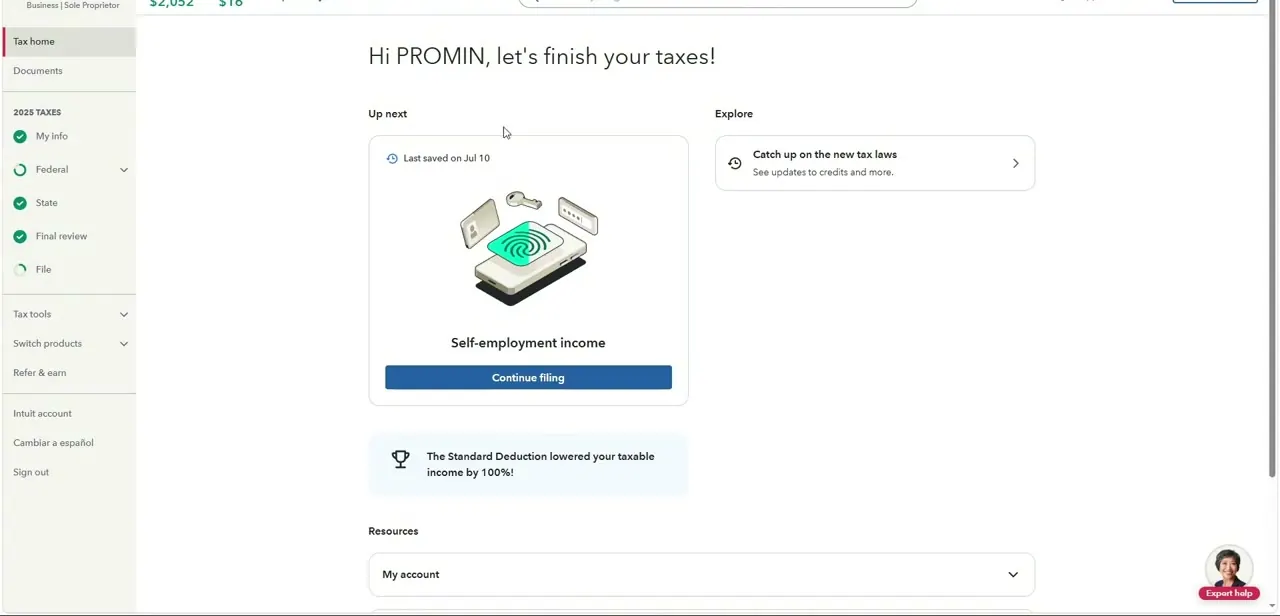
Everything begins on the Tax Home screen, the page TurboTax drops you on after you log in mid-return. It greets you by name and shows an "Up next" card for whatever section you left off in, along with a checklist down the left side — My Info, Federal, State, Final review, File — that tracks your progress with green checkmarks. Medical expenses live under Federal, not as their own top-level item, so this is really just your launch pad rather than a place you'll spend much time.
02Open Federal, then Deductions & credits
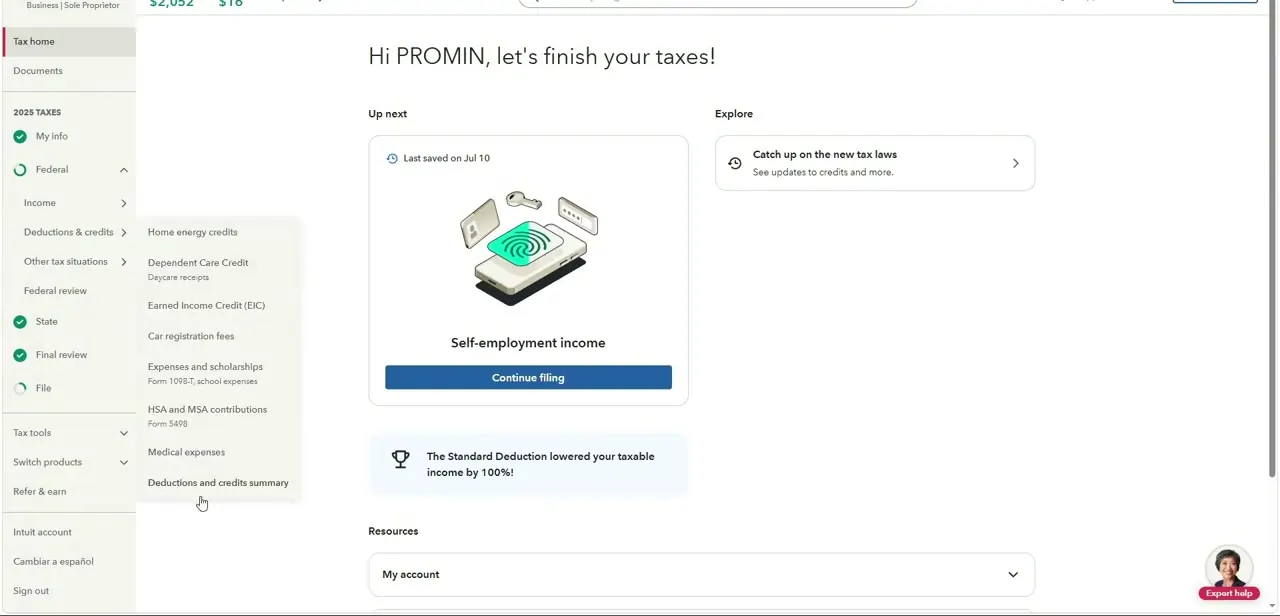
Click Federal in the left sidebar to expand it, then choose Deductions & credits from the sub-menu that appears — Income, Deductions & credits, and Other tax situations sit stacked in that order. A flyout menu lists every deduction category TurboTax handles: home energy credits, dependent care credit, earned income credit, car registration fees, education expenses, HSA and MSA contributions, and — near the bottom — Medical expenses. Clicking it takes you into the guided interview for that section specifically.
03Answer TurboTax's category-by-category questions
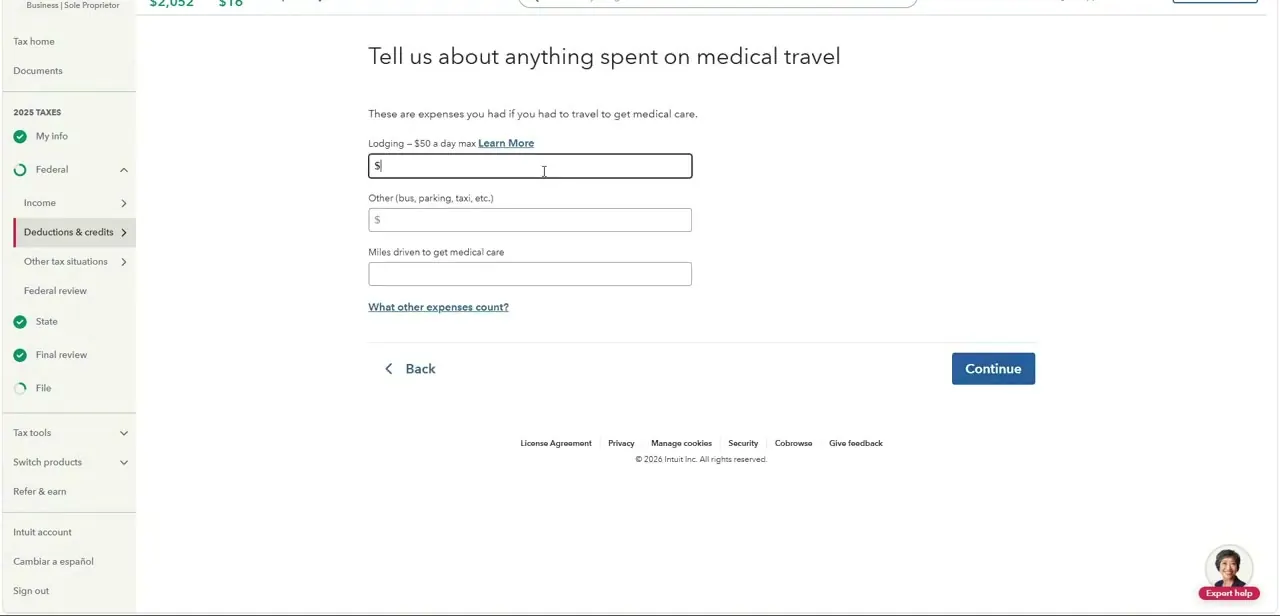
Once inside, TurboTax doesn't hand you one big blank field — it walks through medical costs in categories, one screen at a time. One of those screens asks specifically about medical travel: lodging (capped at $50 a day, with a Learn More link explaining the rule), other travel costs like bus, parking, or taxi fares, and miles driven to get medical care. Fill in whatever applies and leave the rest blank; TurboTax skips categories that don't apply to you as you click Continue through the interview.
04Know what counts before you start entering numbers
Not every health-related purchase qualifies. The IRS generally allows costs for diagnosis, treatment, prevention, and travel tied to medical care, but it excludes purely cosmetic procedures and expenses already reimbursed by insurance or an HSA. TurboTax's Learn More links on each screen are worth clicking the first time you see an unfamiliar category, since the rules for things like travel mileage or home modifications are narrower than most people assume.
05Check the threshold before expecting a deduction
Medical expenses only reduce your taxable income once they exceed a percentage of your adjusted gross income, and only if you itemize instead of taking the standard deduction. TurboTax runs this comparison automatically after you finish entering everything, so don't be discouraged if a modest total doesn't move your refund — it still gets factored in behind the scenes, and it can matter more in a year with a major medical event or procedure.
06Keep records for next year's filing
Whatever you enter this year, save the receipts, mileage logs, and statements that back it up in one folder, physical or digital, as you go rather than reconstructing them next April. Freelancers and small business owners in particular benefit from logging medical costs monthly alongside other deductible expenses, since it turns a stressful year-end scramble into a five-minute copy-paste job when this section comes back around next season.
Frequently asked questions
Where exactly is the medical expenses section in TurboTax?
From Tax Home, open Federal in the left sidebar, then Deductions & credits, and choose Medical expenses from the list of categories that appears.
What medical expenses qualify for a deduction in TurboTax?
Eligible expenses generally include costs for diagnosis, treatment, and prevention of illness, plus related travel like mileage, lodging, and transportation to appointments — TurboTax prompts you through each category as you go.
Is there a minimum threshold before medical expenses count?
Yes. The IRS requires medical expenses to exceed a percentage of your adjusted gross income before they reduce your taxable income, and you generally need to itemize deductions rather than take the standard deduction to benefit.
Do freelancers track medical expenses differently than employees?
Freelancers and small business owners often need to track health-related expenses more meticulously since they may not have employer-provided coverage offsetting costs, and self-employed health insurance premiums can sometimes be deducted separately from this section.
Can TurboTax help me avoid missing eligible expenses?
The guided interview breaks costs into specific categories — like medical travel, lodging, and mileage — with Learn More links on unfamiliar ones, which helps you catch expenses you might not have thought to enter otherwise.
Watch the full walkthrough
The same steps, demonstrated on screen from start to finish.


