 Easy Tech Tuts
How to Set Up Gift Cards in Shopify | Boost Holiday Sales | Easily 2026
By Impran M N
Gift cards are one of the quickest wins on a Shopify store, especially heading into the holidays. They bring in money before you've shipped anything, they pull the recipient back to your store to spend, and Shopify handles them natively — no app, no code.
The catch is that the setting lives in its own corner of the admin, and the difference between issuing a single card and selling gift cards as a product trips a lot of people up. This guide walks the whole flow from a fresh admin, shows exactly what each screen looks like, and finishes with the pricing and timing choices that actually move holiday numbers.
01Open your Shopify admin
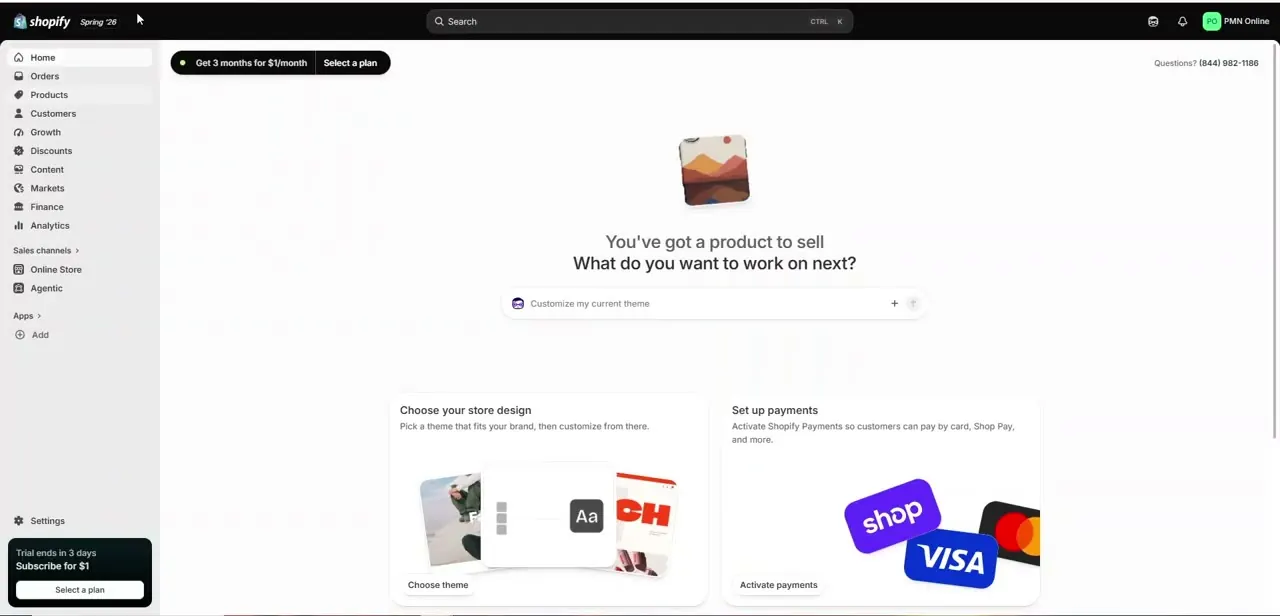
Everything starts from the admin dashboard — the screen you land on after logging in at your store's admin URL. The left-hand menu is where you'll spend the whole setup: Home, Orders, Products, Customers, and so on down to Settings at the bottom.
Gift cards aren't a top-level item here; they sit inside Products, which is worth knowing because the natural instinct is to hunt for them under Discounts or Marketing. If your store is new, you'll also see prompts to choose a theme and activate payments — you don't need either finished to create a gift card, but you do need Shopify Payments or another provider switched on before a customer can actually buy one, so it's worth sorting that out in the same session.
02Go to the Gift cards page
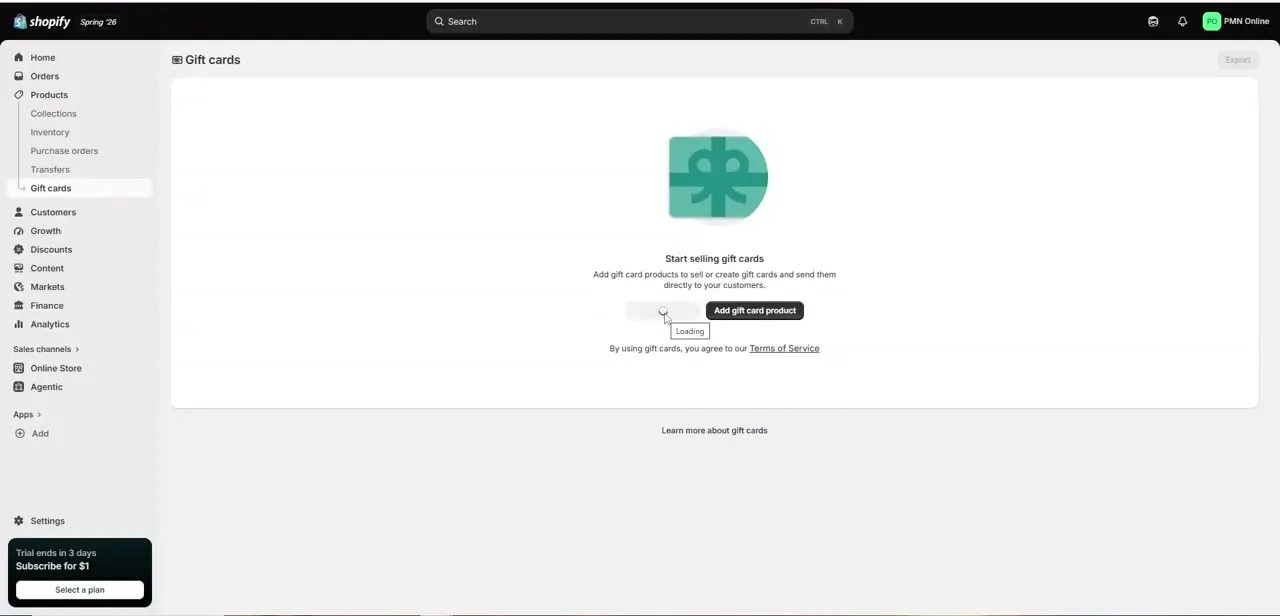
From the left menu, open Products and choose Gift cards. On a store that has never issued one, you'll land on an empty Gift cards page headed "Start selling gift cards," with a short line explaining that you can create products customers buy or issue cards directly to specific people.
This one page is the home for the whole program — every card you create shows up here with its remaining balance and status, which is what lets you audit redemptions later instead of guessing. Two buttons matter: one adds a gift card product for your storefront, and one issues a card to a named customer. They lead to different flows, so decide up front whether you're stocking your store or handing a card to a particular person before you click.
03Create the card and set its details
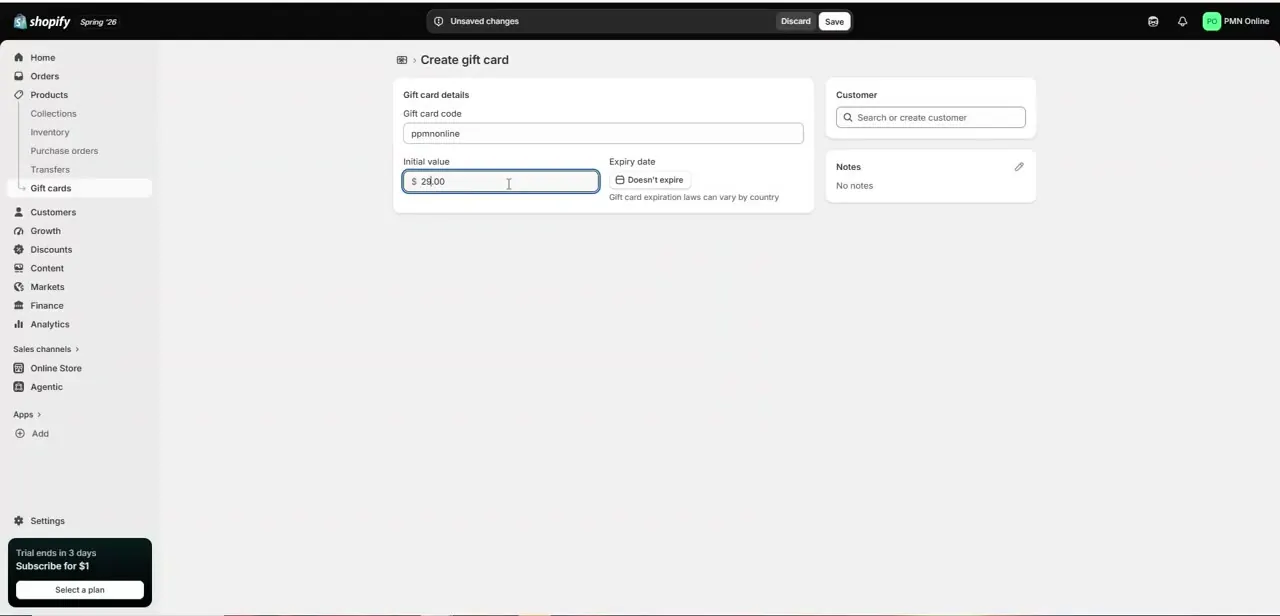
Issuing a card opens the Create gift card form, and it's short by design. The Gift card code is generated for you — you can keep it or type your own for something memorable in a promotion.
Initial value is the starting balance; enter a whole amount like 25.00 and remember this is real money the moment the card is active. Expiry date defaults to "Doesn't expire," which is the safest choice in most regions since gift-card expiration is regulated and varies by country — Shopify flags this right on the form.
You can attach the card to a customer so it lands in their account and email, or leave it unassigned. Add a note if you want a record of why it was issued. Save, and the card is live and spendable at checkout immediately.
04Choose values that fit holiday buyers
Once the mechanics work, the money question is what denominations to offer. Fixed amounts convert better than an open field, because a gift buyer standing in front of a blank box hesitates, while a row of tidy choices makes the decision for them.
Anchor your options around your typical order value: if most orders land near 40 dollars, offering 25, 50, and 100 nudges buyers upward without pushing casual shoppers away. Round numbers photograph and market cleanly, and a slightly premium top option gives generous gifters somewhere to go. If you sell gift cards as products rather than issuing them one by one, set these as distinct variants so shoppers pick from a clear menu instead of typing a number, and so your reporting stays clean per denomination.
05Promote them before the season peaks
A gift card sitting in your catalog earns nothing — the stores that win with them treat the card as a headline product for a few weeks, not a footnote. Feature it on the homepage and in the main navigation from early in the season, since gift cards are the classic last-minute purchase and you want to be the obvious option when someone realizes on the 22nd that they're short a present.
Put it in your holiday email, mention it at checkout as an add-on, and lean on the one thing a gift card does that nothing else in your store can: it delivers instantly, with no shipping cutoff. That instant-delivery angle is your strongest line in the final week, when physical products can no longer arrive in time.
Frequently asked questions
Do I need an app to sell gift cards on Shopify?
No. Gift cards are a built-in feature — you create and manage them from Products → Gift cards in your admin, with no third-party app required on any current Shopify plan.
What's the difference between issuing a gift card and selling one?
Issuing a card creates a single card for a specific person (the Create gift card form covered above). Selling one means adding a gift card product to your storefront that any customer can buy — same section, different button.
Do Shopify gift cards expire?
They default to "Doesn't expire," and in many regions gift-card expiration is restricted or banned by law. Shopify surfaces this on the form itself, but check the rules for your country before setting an expiry date.
Can a customer pay with a gift card and a discount code together?
Usually yes, but it depends on your checkout configuration. Run a test purchase with both applied before a promotion goes live so there are no surprises during your busiest week.
Are gift cards worth it for a small store?
Often more so than for a large one — they bring in revenue up front, cost nothing to stock, and reliably return the recipient to your store, which is exactly the repeat traffic a smaller shop needs around the holidays.
Watch the full walkthrough
The same steps, demonstrated on screen from start to finish.



