Easy Tech Tuts
How to Find Competitors Backlinks in Semrush Easily 2026
By Impran M N
Studying where your competitors get their backlinks is one of the fastest ways to find new link building opportunities, because someone else has already done the outreach work and proven those sites will link out. This guide walks through Semrush's Backlink Analytics tool using a real competitor lookup, showing how to read the overview numbers, dig into the raw backlink list, and filter down to the links that actually matter. It's aimed at anyone — blogger, in-house marketer, or agency researcher — who wants to reverse-engineer a competitor's link profile instead of guessing where to pitch next.
01Open Backlink Analytics and load a domain
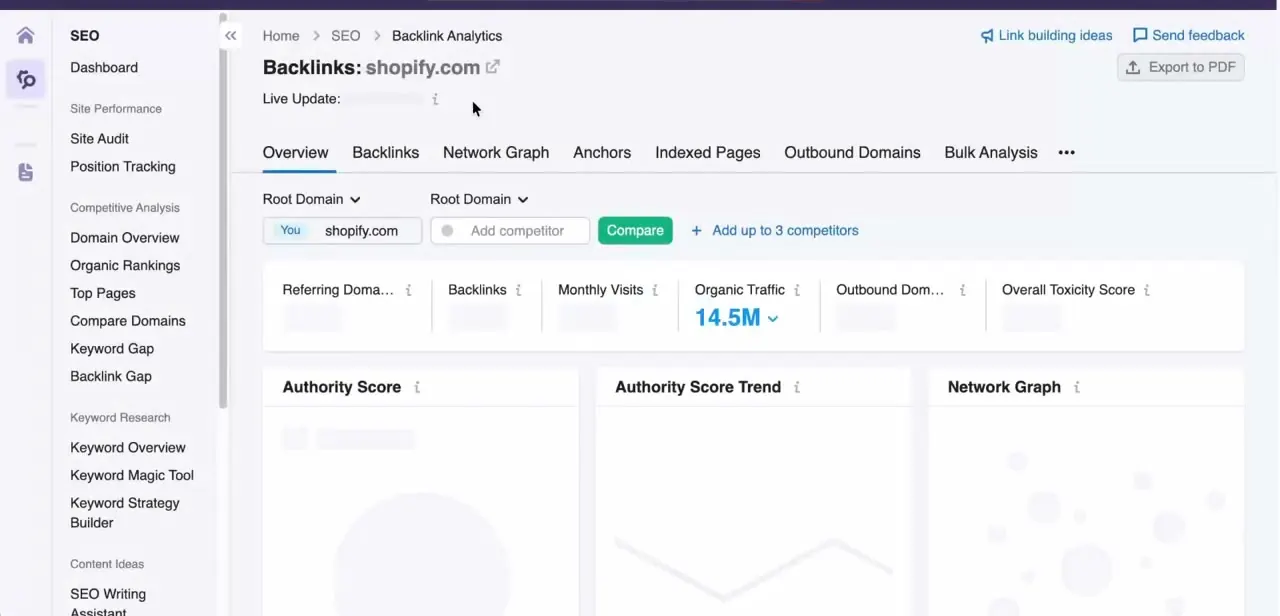
From the Semrush sidebar, the Backlink Analytics tool sits under Competitive Analysis. Type any competitor's root domain into the search box and hit Analyze — Semrush pulls up an overview page headed with that domain, plus a Live Update note showing how current the data is.
Along the top you get five headline metrics in one row: Referring Domains, Backlinks, Monthly Visits, Organic Traffic, and Authority Score, with a compare panel next to them where you can add up to three more competitors side by side. That comparison panel is worth using immediately — seeing your authority score against three rivals at once tells you in seconds whether you're actually behind on links or just behind on content.
02Switch to the Backlinks tab for the raw link list
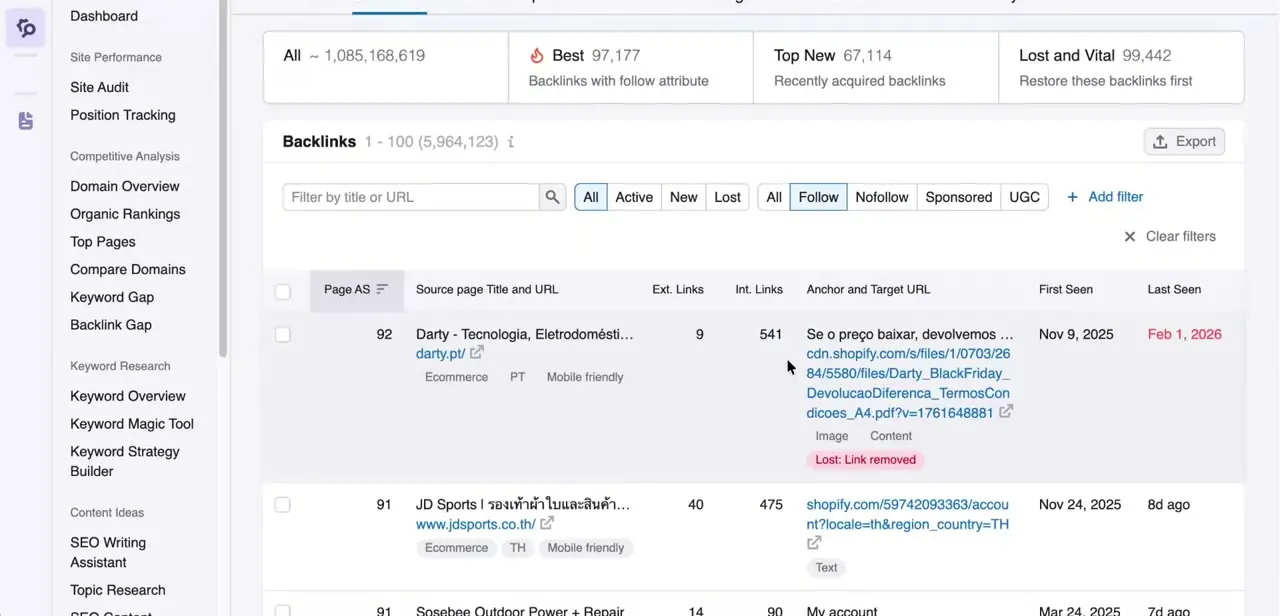
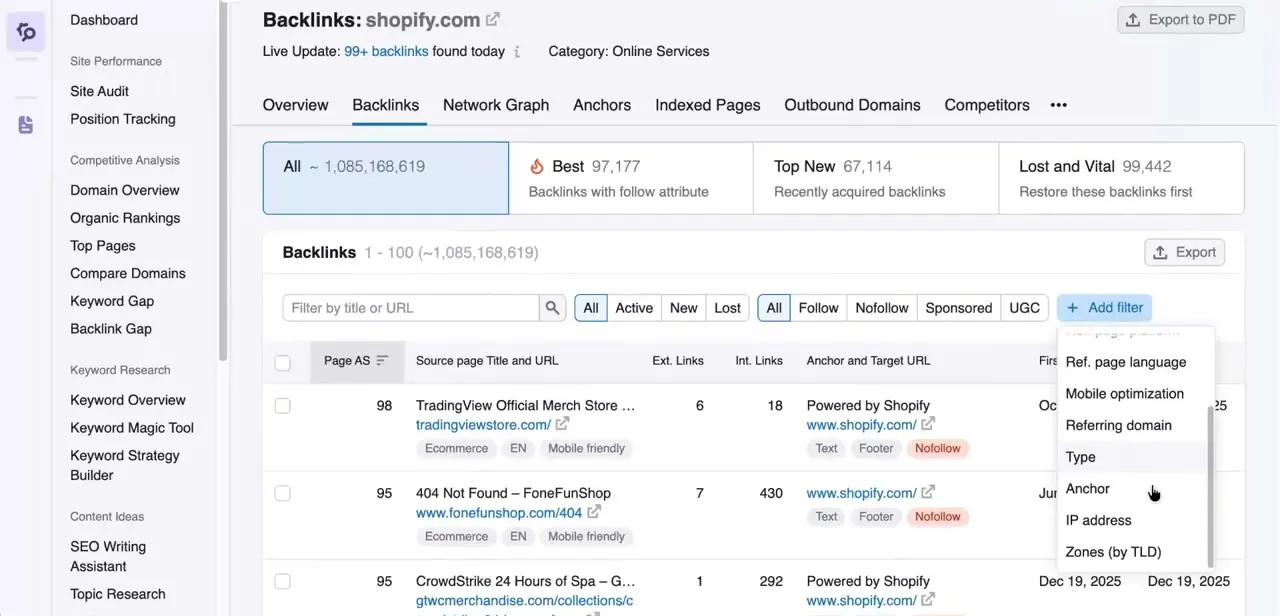
The overview gives you the scale of a competitor's link profile; the Backlinks tab gives you the actual links. Here every individual backlink is listed with its Page Authority Score, the source page's title and URL, its external and internal link counts, the anchor text used, and the exact target URL it points to.
Two dates matter more than people expect: First Seen and Last Seen. A link with a recent Last Seen date is still live and passing value; one that stopped updating months ago may have been removed, which is exactly the kind of link worth investigating before you copy the same placement.
03Filter by follow type before you do anything else
Right above the link list sit filter tabs for All, Follow, Nofollow, Sponsored, and UGC. This distinction decides whether a link is even worth chasing for SEO purposes: follow links pass authority to the destination page, while nofollow, sponsored, and UGC tags tell search engines not to pass that credit. If you're building an outreach list to replicate a competitor's link building, filter to Follow first — that narrows thousands of results down to the subset that's actually contributing to their rankings, rather than the review-site and comment links that just add noise.
04Add filters for referring domain, anchor text, and more
Click Add Filter next to the search box and Semrush opens a dropdown of additional fields you can filter by: referring domain, anchor text, type, IP address, page language, mobile optimization, and TLD zone, among others. Filtering by anchor text specifically shows you what phrases other sites are using to link to your competitor, which is a direct signal of how the market perceives that page — useful both for spotting keyword opportunities and for noticing if a competitor's anchors look unnaturally over-optimized around one exact phrase.
05Sort by Page Authority Score to prioritize outreach
With over a million backlinks possible for a large domain, you can't chase every one. Click the Page AS column header to sort the list from highest to lowest authority score, and work down from the top. A handful of high-authority referring pages usually contribute more ranking value than hundreds of low-authority ones, so this single sort turns an unmanageable list into a realistic weekly outreach target of maybe twenty to fifty sites.
06Run a Backlink Gap report to find what you're missing
The sidebar also lists a dedicated Backlink Gap tool under Competitive Analysis. Enter your own domain alongside up to four competitors, and it returns a comparison table of every referring domain, flagging which ones link to your competitors but not to you. This is the single most actionable output of the whole workflow, because it's not just a list of links — it's a list of sites that have already demonstrated they'll link to businesses in your space, making cold outreach considerably warmer.
Frequently asked questions
Can I see every backlink a competitor has?
Semrush shows a large database of backlinks it has indexed, though it may not capture every single link that exists across the entire web.
What's the difference between dofollow and nofollow links?
Dofollow (Follow) links pass link equity that can help SEO, while nofollow, sponsored, and UGC links generally don't, though all of them can still bring referral traffic.
What is the backlink gap tool used for?
The Backlink Gap tool compares your domain against up to four competitors to reveal referring domains linking to them but not to you, which is a ready-made outreach list.
How does authority score help prioritize link building?
Sorting the Backlinks tab by Page Authority Score lets you focus on the handful of high-value referring pages first instead of working through a list that can run into the millions.
Should I filter by anchor text when researching a competitor?
Yes — the anchor text filter under Add Filter shows exactly what phrases other sites use to link to a competitor's pages, which surfaces keyword opportunities and can reveal over-optimized anchor patterns.
Watch the full walkthrough
The same steps, demonstrated on screen from start to finish.