 Easy Tech Tuts
Jira vs Trello, Best Jira Alternatives from Asana, ServiceNow, Confluence Clickup in the AI Era 2026
By Impran M N
Every team eventually hits the same wall: the spreadsheet or sticky-note system that worked at five people stops working at fifteen. Jira and Trello are usually the first two names that come up, but they solve different problems, and the alternatives around them — Asana, ServiceNow, Confluence, ClickUp — each carve out their own niche rather than being interchangeable substitutes. This guide walks through what a working Jira board actually looks like once a team is using it, what Asana's dashboard shows you at a glance, and where ClickUp's all-in-one approach fits, so you're comparing real interfaces instead of just feature lists.
01What a working Jira board looks like
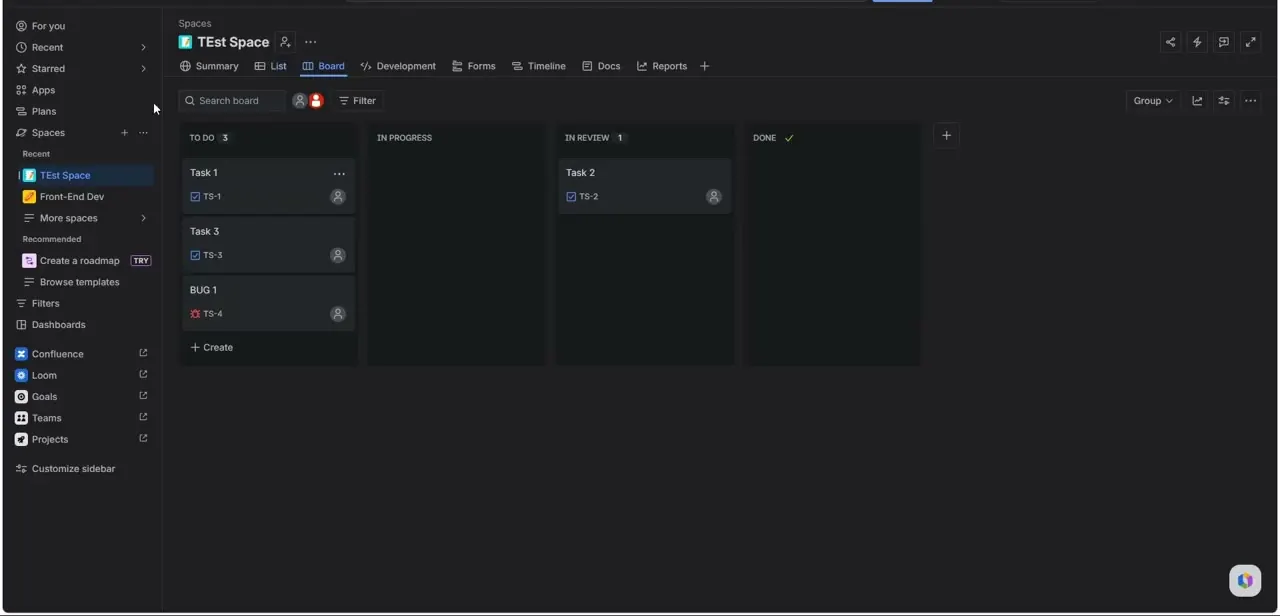
Jira organizes work into a board with columns like To Do, In Progress, and In Review, and every task carries a short code — TS-1, TS-2, and so on — that ties it back to its space and makes it referenceable in commits, docs, or conversation. The left sidebar keeps Spaces, Filters, and connected Atlassian products like Confluence, Loom, and Goals one click away, which is the core of Jira's pitch: it's not just a board, it's a hub that assumes your team's docs, goals, and code all live nearby. That depth is exactly why Jira has a reputation for a steeper learning curve than Trello — there's simply more surface area to configure before a new space feels like your team's actual workflow rather than a generic template.
02Where Trello wins on simplicity
Trello strips project management down to cards on a board, dragged between lists, with almost none of Jira's configuration overhead. There's no ticket-numbering scheme to learn and no workflow rules to set up before the board is usable — you make a list, add a card, and you're working.
That simplicity is the whole appeal for small teams, freelancers, or anyone managing a personal project who doesn't need custom fields, sprint planning, or issue types. The tradeoff shows up as a team scales: Trello's power-ups can bolt on automation and reporting, but at a certain size and complexity, teams often outgrow it and migrate to something built for structured workflows from the ground up — which is usually the point where Jira enters the conversation.
03What Asana's dashboard actually shows you
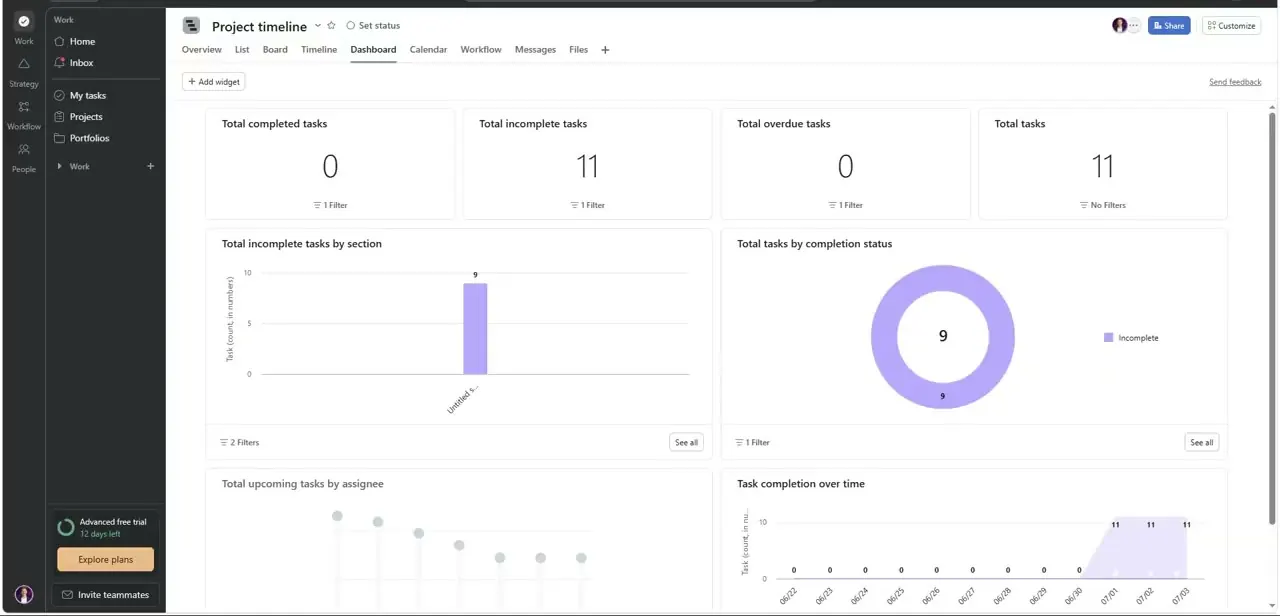
Asana leans into reporting in a way that's visible the moment you open a project's Dashboard tab: total completed tasks, incomplete tasks, overdue tasks, and a breakdown by section, rendered as bar charts and donut charts you can add or remove as widgets. It's a different mental model from Jira's ticket-centric board — Asana is built around timelines, portfolios, and cross-project visibility, which suits teams whose work spans multiple initiatives rather than a single engineering backlog. The free trial banner and "Explore plans" prompt in the sidebar are also a reminder that Asana's more advanced reporting, like the ones shown here, sits behind paid tiers once a team grows past the basics.
04Where ServiceNow and Confluence actually fit
ServiceNow and Confluence aren't head-to-head Jira substitutes in the way Asana or ClickUp are — they solve adjacent problems. ServiceNow is built around IT service management and workflow automation across a whole organization, useful when the work in question is ticket routing, incident response, or employee requests rather than product development.
Confluence is a documentation and knowledge-base tool that Atlassian sells alongside Jira specifically because the two are meant to be used together — Jira tracks the work, Confluence holds the specs and meeting notes that explain why the work exists. If your team is choosing a Jira alternative because Jira itself feels heavy, neither of these solves that; they're additions to a stack, not replacements for the board.
05ClickUp's all-in-one workspace
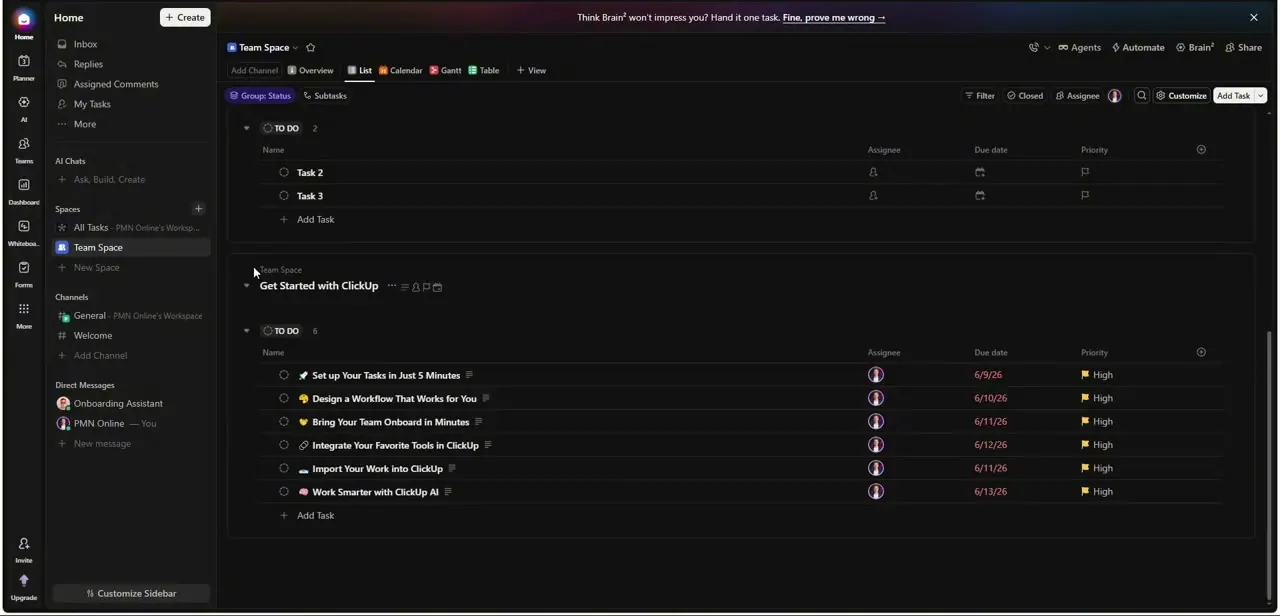
ClickUp's interface packs Home, Spaces, Channels, and Direct Messages into one sidebar, with chat and AI assistants sitting alongside the task lists — a deliberate bet that teams would rather have one tool for tasks, docs, and messaging than stitch several together. A new workspace ships with an onboarding list — "Set up Your Tasks in Just 5 Minutes," "Design a Workflow That Works for You" — that doubles as a real task list you check off, which is a smoother first-run experience than staring at an empty board. The tradeoff is the same one Jira has: more built-in surface area means more to learn, though ClickUp's onboarding checklist noticeably softens that curve compared to Jira's blank-space setup.
06Picking based on how your team actually works
The honest way to choose isn't picking the tool with the longest feature list — it's matching the tool to how your team already works. If you're running sprints with a dedicated engineering team, Jira's structure pays for itself.
If you're a small team or solo operator who wants to start working today, Trello's low overhead wins. If cross-project visibility and reporting matter more than ticket detail, Asana's dashboards are built for that.
And if you'd rather consolidate tasks, docs, and chat into one place and can tolerate the setup time, ClickUp is the one making that bet most explicitly. AI features are showing up across all of them now — smarter task suggestions, automated status updates — but they're a secondary factor next to whether the core workflow model actually fits your team.
Frequently asked questions
Should I choose Jira or Trello for my team?
It depends on your workflow: Jira suits structured, agile development with sprints and ticket tracking, while Trello's simpler card-and-list model suits smaller teams or projects that don't need custom workflows.
Are Asana, ServiceNow, Confluence, and ClickUp all direct Jira alternatives?
Not equally. Asana and ClickUp are genuine alternatives for task and project tracking. Confluence is a documentation tool Atlassian pairs with Jira rather than a replacement for it, and ServiceNow targets IT service management, not product development boards.
What does Asana's dashboard show that a Jira board doesn't?
Asana surfaces aggregate reporting by default — completed vs. incomplete vs. overdue task counts and completion trends as charts — where Jira's board view focuses on individual tickets moving through status columns.
Is ClickUp harder to learn than Trello?
Generally yes, because it bundles tasks, docs, chat, and AI tools into one workspace rather than Trello's single board-and-card model, though ClickUp's built-in onboarding checklist helps smooth that learning curve.
How is AI changing these project management tools?
Most of these platforms are adding AI features for task suggestions, automated status updates, and smarter search, but the core decision should still come down to which workflow model — board, timeline, or all-in-one workspace — fits your team.
Watch the full walkthrough
The same steps, demonstrated on screen from start to finish.


