 Easy Tech Tuts
How to Connect HubSpot With Microsoft Power BI (Sales Data Setup) Easily 2026
By Impran M N
Manually exporting HubSpot data into spreadsheets doesn't scale once your sales team grows, and connecting it directly to Power BI closes that gap. Power BI has no dedicated, built-in HubSpot connector the way it does for Dynamics or Salesforce, so the common route is a feed-based connection through Get Data's Online Services category.
This guide covers where that connection point lives, how the feed dialog works, and what a finished pipeline report can look like once deal data is flowing in. It's aimed at sales teams and marketers who want live reporting instead of static exports.
01Prepare HubSpot access before touching Power BI
Before opening Power BI, confirm the HubSpot side is ready: you'll need API or connector-level access enabled on your account, which usually depends on your subscription tier. Have your account's feed or API endpoint handy, since the next step asks Power BI to authenticate against it directly rather than walking you through a HubSpot-branded sign-in screen.
02Open Get Data and choose Online Services
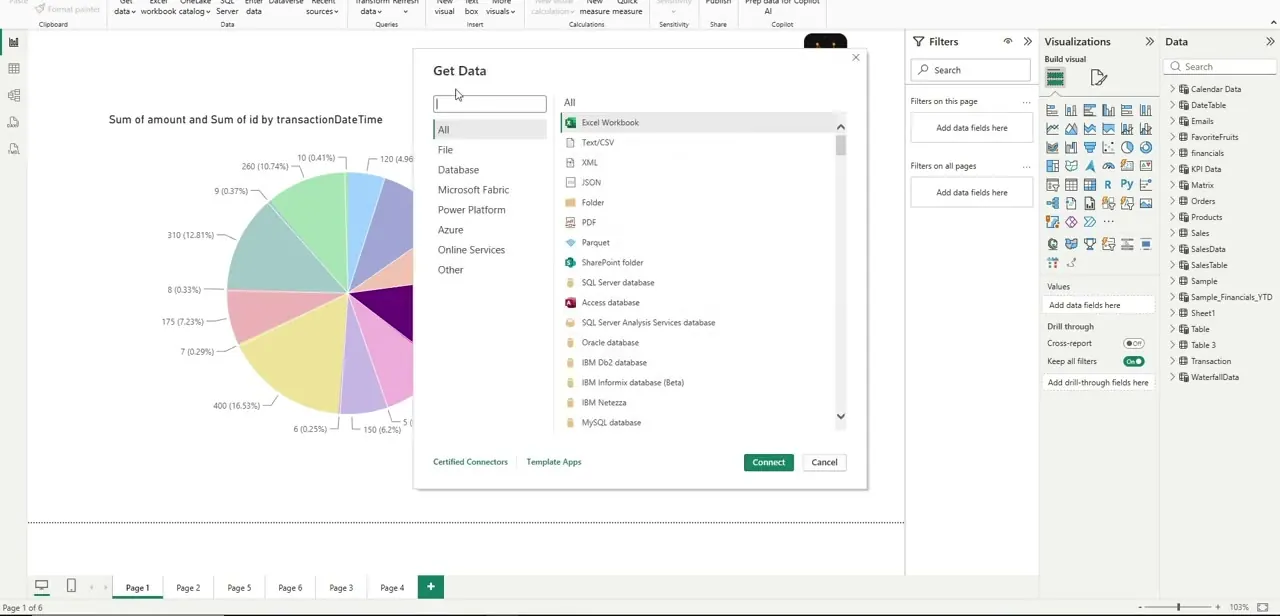
In Power BI Desktop, click Get Data to open the full source catalog, organized into categories like File, Database, Power Platform, and Online Services along the left side. HubSpot isn't listed as its own named connector in this catalog, which is the detail that trips people up — they scroll hunting for a HubSpot logo that isn't there. Instead, the practical path is a generic feed connector under Online Services, which is what the rest of this setup uses.
03Connect using the OData feed option
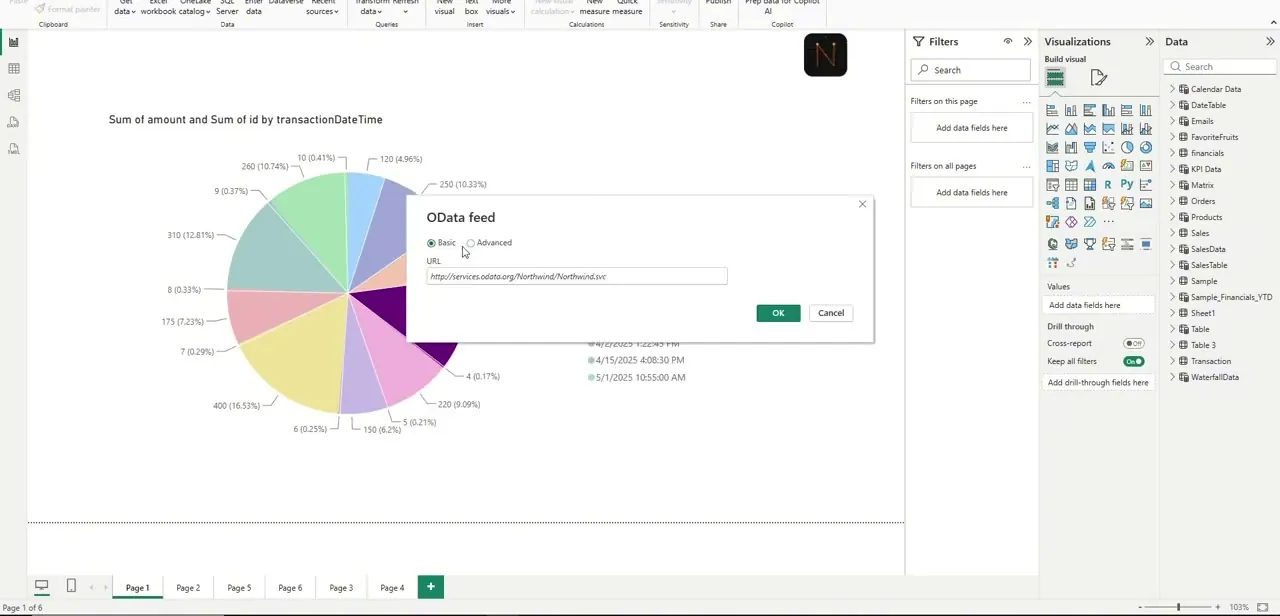
Selecting the OData feed connector opens a simple dialog with Basic and Advanced modes and a single URL field. This is the mechanism that lets Power BI treat a data feed as a live source it can query and refresh, rather than a one-time file import. Paste your account's feed endpoint here — the field accepts any valid OData address, so the exact URL you use depends on how your HubSpot data is exposed, whether that's a direct account endpoint or one provided through a middleware/reporting layer.
04Pull in deal and pipeline objects
After the feed connects, Power BI's Navigator lists the tables it found — for a sales setup this typically means deals, contacts, and pipeline stage objects. Select only the tables you'll actually report on rather than loading everything, since HubSpot accounts can expose a large number of tables and an over-broad import slows both the load and every refresh after it. Confirm field names line up with what you expect — deal amount, stage, close date — before moving to visuals.
05Build the pipeline view
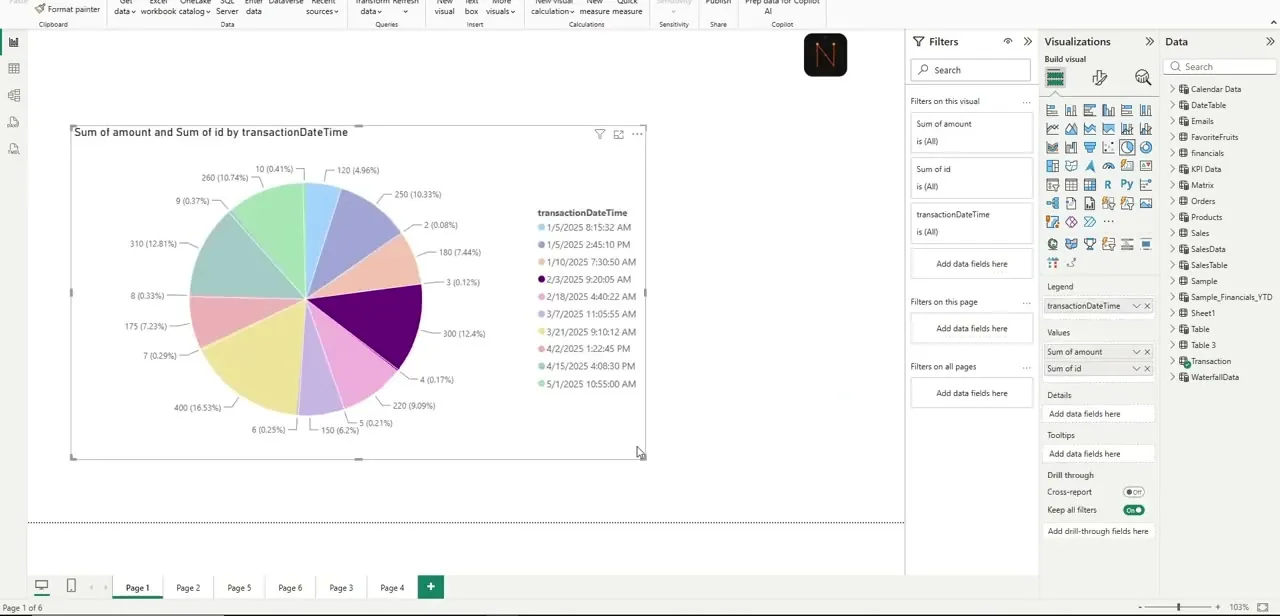
With sales data loaded, a pie or bar visual broken out by a date or stage field is usually the fastest way to see where deals sit. The example report here shows a "Sum of amount and Sum of id by transactionDateTime" chart — a breakdown of deal value across dated buckets, colored by segment — which is the kind of at-a-glance view sales leaders check daily. Swap the legend field to pipeline stage instead of date if you want to see where deals are stuck rather than when they closed.
06Tighten the report for daily use
Group related metrics onto a single page rather than spreading pipeline value, rep performance, and deal counts across separate tabs — sales leaders checking this once a day want one screen, not five. Add slicers for date range and sales rep so anyone viewing the report can filter down without editing the underlying visuals, and set a scheduled refresh once the report is published so the numbers don't quietly go stale between manual updates.
Frequently asked questions
Do I need a specific HubSpot plan to connect to Power BI?
Access to HubSpot's API or reporting data typically depends on your subscription tier, so check your plan's data export and integration permissions before setting up the connection.
Does Power BI have a dedicated HubSpot connector?
No. There's no HubSpot-branded connector in Power BI's Get Data catalog. The common workaround is connecting through a generic feed option, such as OData, pointed at your account's data endpoint.
How often does HubSpot data refresh in Power BI?
Refresh frequency depends on how you schedule it in Power BI, ranging from manual refreshes to automated daily or more frequent updates depending on your license.
Can I combine HubSpot data with other sales tools in one report?
Yes, Power BI can connect to multiple data sources at once, so you can blend HubSpot data with other CRM or sales platforms in a single unified report.
Will this integration slow down my HubSpot account?
Standard API-based reporting pulls generally have minimal impact on HubSpot performance, though very frequent refreshes on large accounts could add some load, so scope your table selection carefully.
Watch the full walkthrough
The same steps, demonstrated on screen from start to finish.


