 Easy Tech Tuts
Clickup vs Noton, Best Clickup Alternatives in Monday, Asana, Jira, Trello, Slack in the AI Era 2026
By Impran M N
Picking project management software usually comes down to a handful of real screens, not a feature checklist: how crowded is the sidebar, how fast can a new hire find their tasks, how much of the automation actually shows up where you work. This guide walks through ClickUp against Noton and a run of the alternatives people search for next — Monday, Asana, Jira, Trello, and Slack — using what each tool's interface actually looks like once you're inside it.
None of these platforms are interchangeable; ClickUp and Asana chase the same all-in-one workspace, Jira exists for engineering teams tracking sprints, and Trello's whole pitch runs through Slack rather than a dashboard of its own. By the end you'll have a clearer sense of which one matches how your team actually works, not just which one has the longer feature list.
01Start from ClickUp's home base
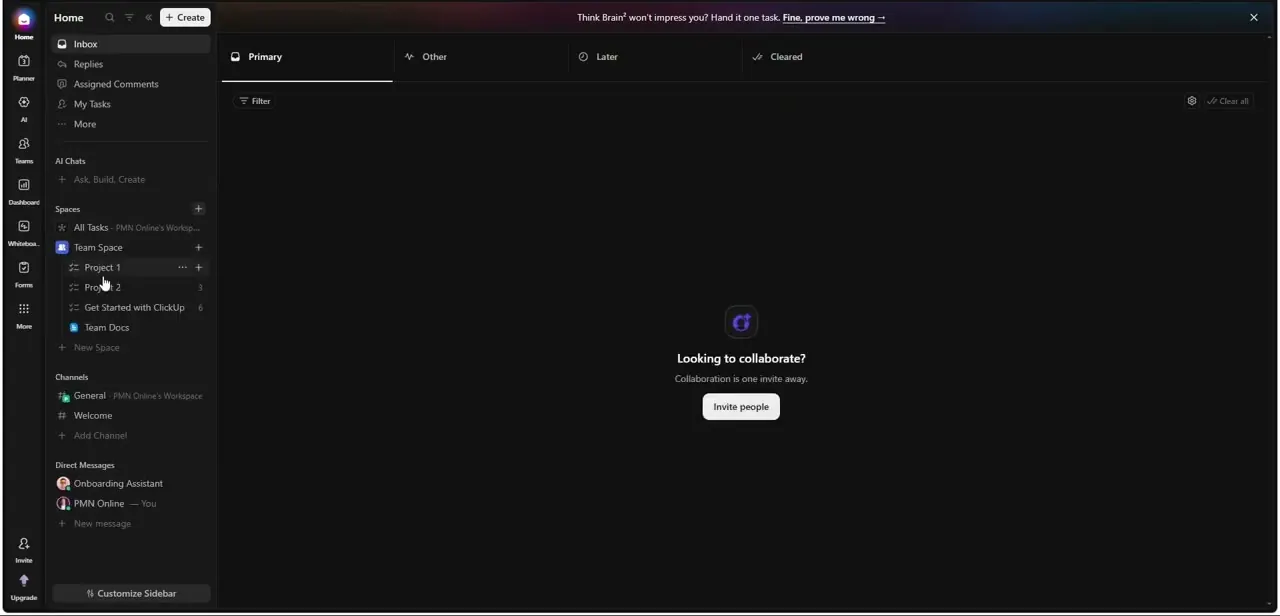
ClickUp organizes everything around a single sidebar: Home, Inbox, Replies, Assigned Comments and My Tasks sit at the top, with AI Chats and your Spaces underneath. A fresh workspace ships with a Team Space already holding Project 1, Project 2, a "Get Started with ClickUp" onboarding list, and Team Docs, so there's a real structure to click into on day one rather than a blank canvas.
Channels and Direct Messages live in the same sidebar too, which is ClickUp's pitch in one screen — task management, docs, and team chat without switching apps. An empty Inbox just prompts you to invite people, which is the honest state most new workspaces are actually in before a team populates it.
02Don't start from a blank Space
ClickUp's Template Center is worth opening before you build anything by hand — it groups Space, Folder, List, Task, Doc, and Whiteboard templates by department and by complexity (Beginner, Intermediate, Advanced), and you can filter by use case instead of scrolling. The Featured section alone offers Agency Management and Quick Start: Product Management, and the Marketing section stacks half a dozen more, from Marketing Team Operations to SEO Project Management. This matters more than it sounds like it should: most of the friction in adopting a new PM tool is the setup step, and a template that already matches your team type collapses that from hours to minutes.
03See how Asana structures the same problem
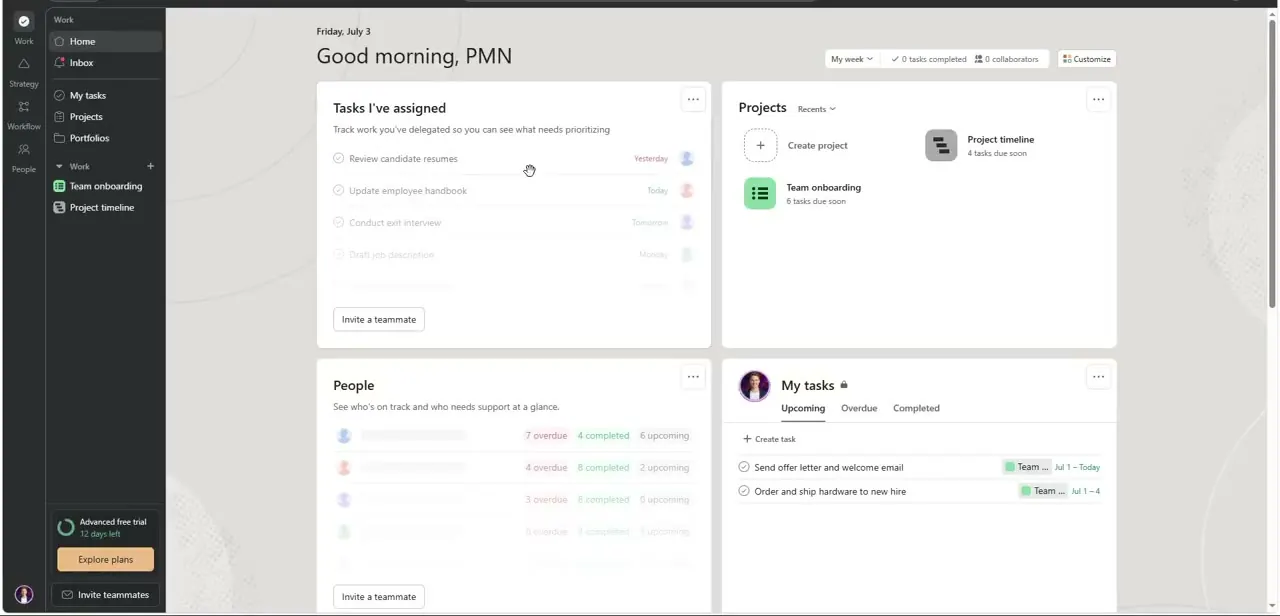
Asana's Home dashboard takes a different approach — instead of a task list front and center, it greets you by name and surfaces "Tasks I've assigned," your active Projects, a People panel showing who's overdue or on track, and your own upcoming, overdue, and completed tasks, all as separate cards on one page. The sidebar keeps Home, My Tasks, Projects, and Portfolios as top-level items, which signals Asana's bias toward reporting across multiple projects rather than living inside one Space at a time. If your team already thinks in terms of portfolios and cross-project status rather than a single shared board, this layout will feel more natural than ClickUp's Space-first structure.
04Understand what Jira is actually built for
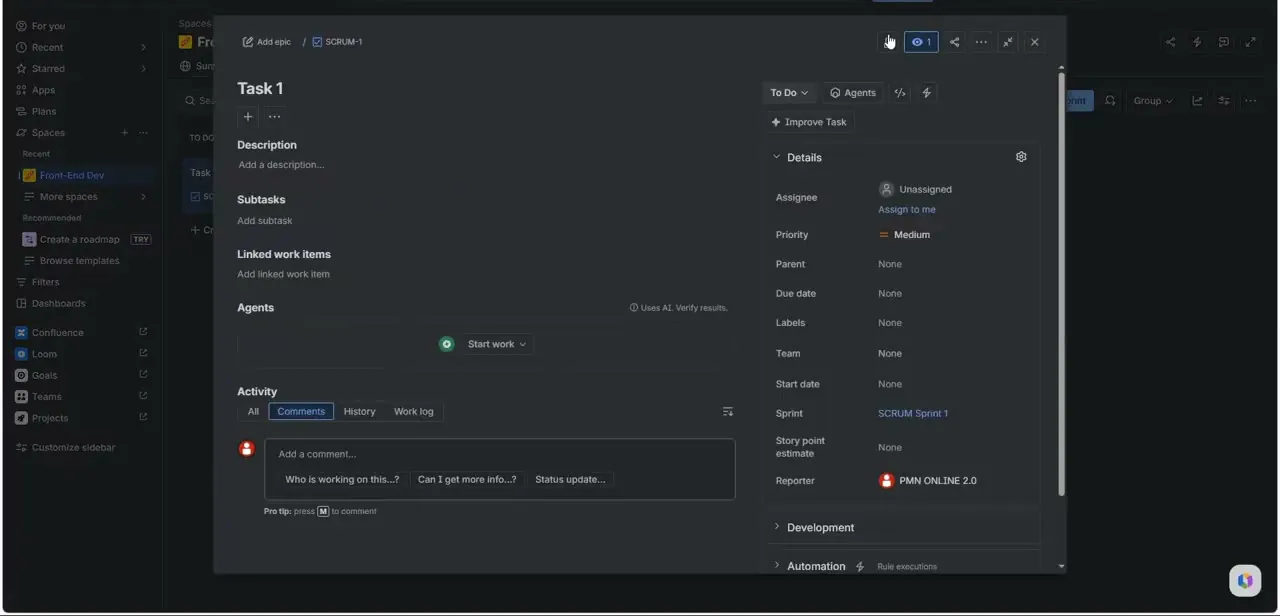
Jira's issue view looks nothing like ClickUp's or Asana's home screens, and that's the point — open a single ticket like SCRUM-1 and you get Description, Subtasks, Linked Work Items, and an Agents panel on the left, with a full details rail on the right covering Assignee, Priority, Parent, Due Date, Labels, Sprint, Story Point Estimate, and Reporter. Activity below splits into All, Comments, History, and Work Log tabs, which is the level of audit trail engineering teams expect and marketing teams rarely need. If your work is organized around sprints, story points, and a backlog rather than loose task lists, Jira's granularity is a feature, not clutter — but that same density is exactly why non-technical teams tend to bounce off it.
05Trello's real home is inside Slack
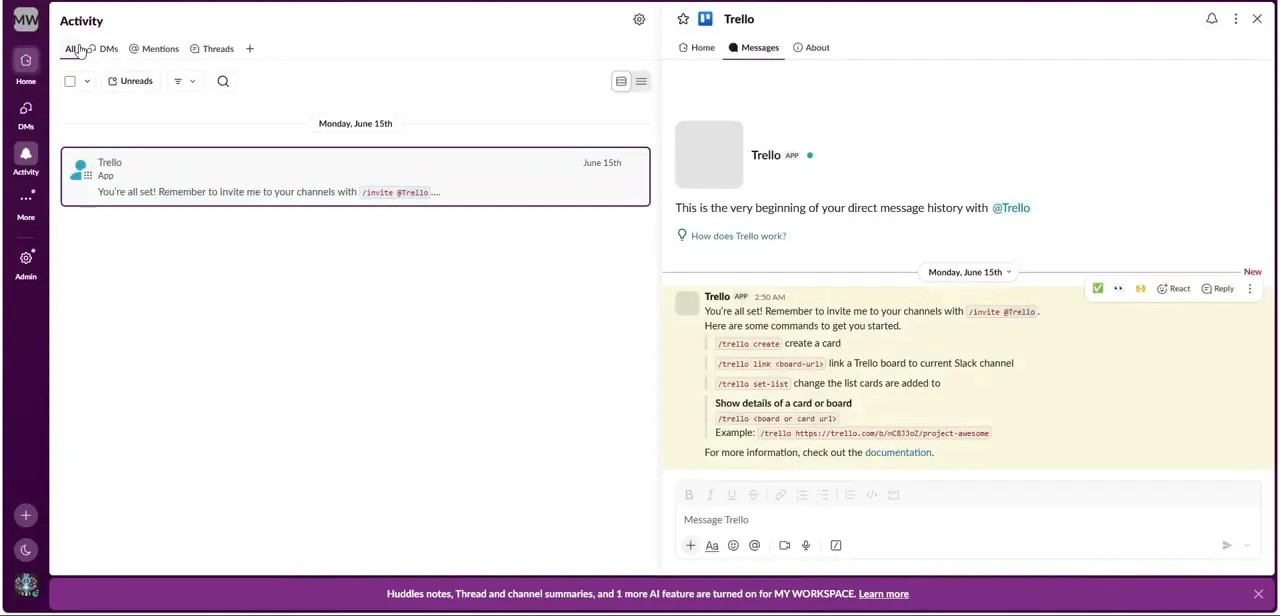
Rather than a standalone dashboard, Trello's automation shows up as a bot living inside Slack — the welcome message lists slash commands like /trello create to spin up a card, /trello link to connect a board to the current channel, and /trello set-list to control where new cards land, all without leaving the conversation. That's a genuinely different model from ClickUp or Asana: instead of pulling your team into a project tool, Trello meets them in the chat app they already have open. For a team that lives in Slack and only needs lightweight card tracking, this is arguably faster to adopt than any full PM suite, since there's no new interface to learn at all.
06Weigh Noton and the AI layer honestly
Noton gets pitched in this comparison as a ClickUp alternative in the same breath as Monday, Asana, Jira, Trello, and Slack, but it's a far less established name than the others here, so treat claims about it more cautiously than the platforms above with a decade of public track record. Every mainstream tool in this list is now layering AI on top of its core workflow — task prioritization suggestions, auto-generated summaries, assistants that live in the sidebar — but the depth of that layer varies a lot between a tool that bolted AI onto an existing product and one built around it from the start. Test the AI features on your own real tasks before trusting them for anything time-sensitive, since a wrong suggestion on a sprint deadline costs more than the minutes it saved.
07Match the tool to your team, not the other way around
If you want one workspace that includes chat, docs, and tasks and don't mind ClickUp's denser sidebar, start there. If you already think in cross-project portfolios and reporting, Asana's Home layout will feel more natural.
Engineering teams running sprints belong in Jira regardless of what's trendy elsewhere, and a team that mostly needs lightweight cards without adopting a new app should look hard at Trello-through-Slack before buying anything bigger. Whichever you pick, run a two-week pilot with one real project before migrating everything — the interface differences shown here matter far less in a screenshot than they do once your whole team is using one daily.
Frequently asked questions
Which is easier for beginners, ClickUp or Noton?
ClickUp ships with a Template Center and a pre-built "Get Started with ClickUp" list in every new workspace, which gives beginners a structured starting point. Noton is a much newer, less documented name in this space, so verify its onboarding directly before assuming parity.
How does Slack fit in as a ClickUp alternative?
Slack itself isn't a project management tool, but its Trello app turns Slack into a lightweight task tracker through slash commands like /trello create — useful for teams that want card tracking without adopting a separate PM app.
What's the real difference between Jira and the others here?
Jira's issue view exposes sprint, story point, and audit-trail fields (Assignee, Priority, Sprint, Work Log) that ClickUp and Asana don't surface by default. It's built for engineering teams running structured sprints, not general task tracking.
Do these tools use AI to help manage projects?
Yes — ClickUp, Asana, Jira, and Trello have all added AI features such as assistants, suggested prioritization, and auto-summaries. How deep that layer goes varies by platform, so test it on real work before relying on it.
Which tool is best for a small team just starting out?
For an all-in-one workspace, ClickUp's templates lower the setup cost significantly. For a team already living in Slack, the Trello integration may be the fastest path to organized tasks with zero new software to learn.
Watch the full walkthrough
The same steps, demonstrated on screen from start to finish.


