Easy Tech Tuts
How to Embed Typeform in an Email Easily 2026
By Impran M N
Sending an email audience off to fill out a form works better when the ask feels like a natural next click rather than a cold link at the bottom of a newsletter. Typeform doesn't render as a live, interactive form inside most inboxes — email clients are too locked-down for that — so the real skill is choosing the right link, button, or preview image and making it look intentional. This guide covers exactly where that email-specific sharing option lives inside Typeform, what it hands you, and how to turn it into something people actually click.
01Open the form you want to share
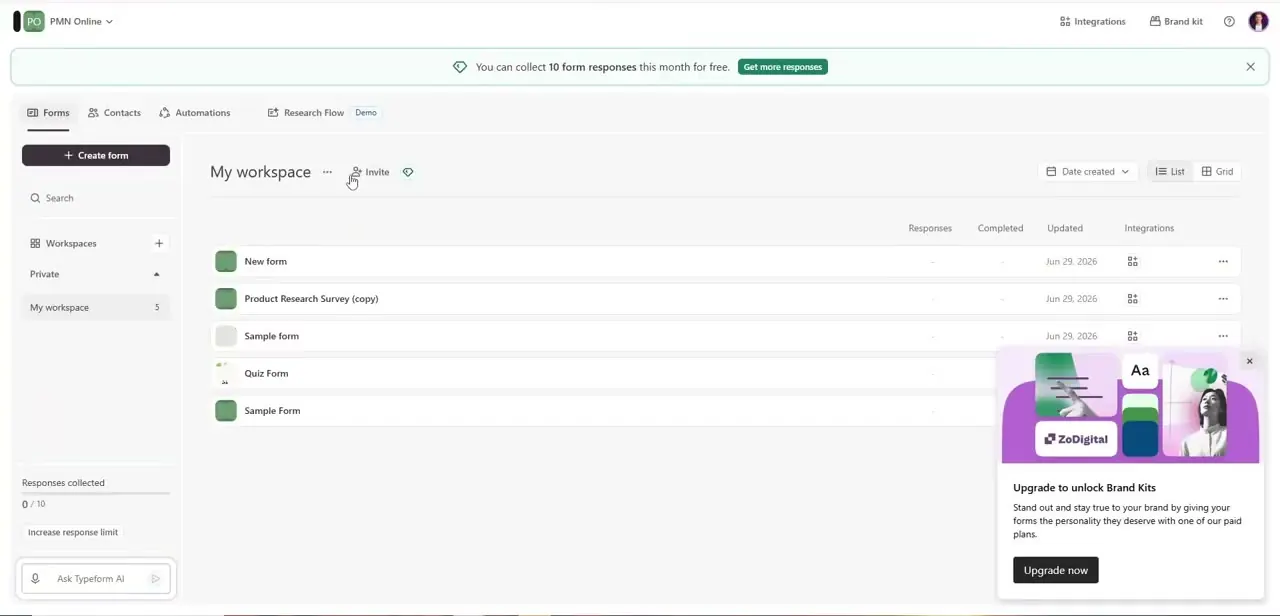
From My workspace, click into the specific form — the same list that shows response counts and last-updated dates for everything you've built. If you're on a free plan, you'll notice prompts here too, like an offer to unlock a Brand Kit on a paid plan so shared links and previews carry your own logo and colors instead of Typeform's defaults. That's worth knowing before you start sharing broadly by email, since an unbranded preview card looks noticeably more generic in an inbox than a branded one.
02Go to Share and choose Embed in an email
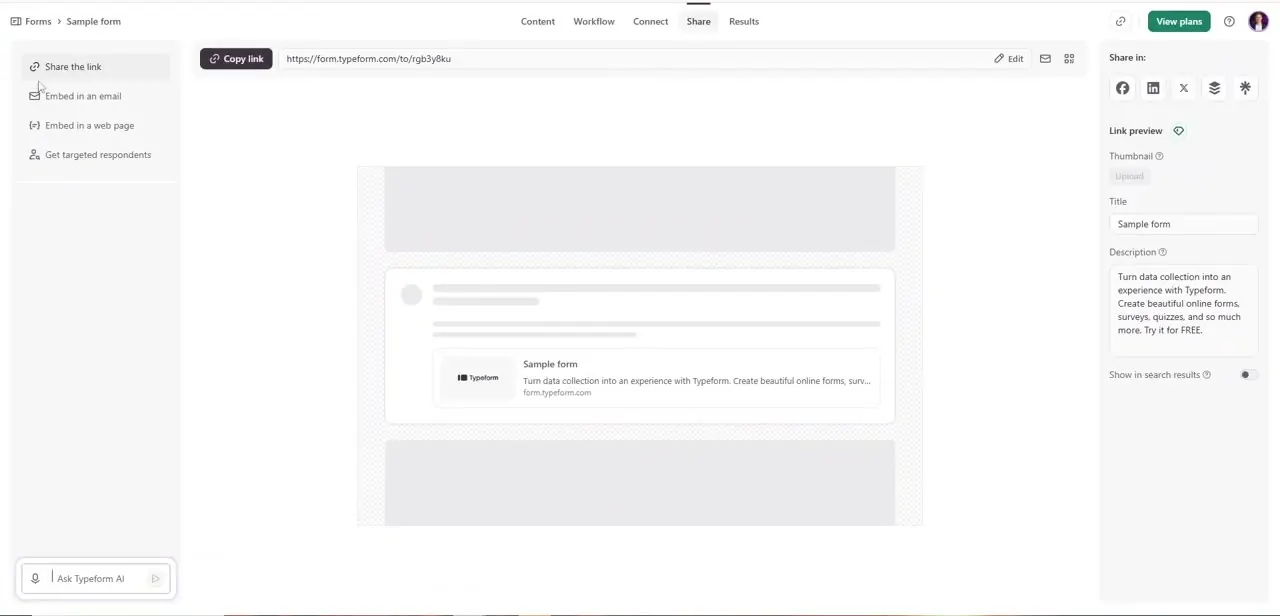
Inside the form, click Share in the top navigation. The left sidebar splits your options clearly: Share the link, Embed in an email, Embed in a web page, and Get targeted respondents.
Selecting Embed in an email is what surfaces the version of the link and preview built specifically for inbox use, distinct from a generic web embed. This is the step people skip — using the plain "Share the link" URL works fine too, but the email-specific option is tuned for how link previews render in mail clients.
03Copy the link and set its preview details
The main panel gives you a Copy link button next to the full form URL, plus a Link preview section where you set a Thumbnail image, Title, and Description — the exact text and image that render when the link is pasted into an email that supports link unfurling. Write the title and description as if they're the pitch, not a placeholder: "Quick 2-minute survey" with a description naming what's in it for the reader converts better than the form's default name. This preview is what shows up before anyone even clicks, so it carries more weight than people expect.
04Place the link as a button, not bare text
Inside your email marketing platform's editor, paste the copied link behind a clearly labeled button rather than a plain blue hyperlink — "Take the 2-Minute Survey" outperforms a raw URL because a button reads as an action, not a footnote. If your platform supports image blocks, you can also use the thumbnail you set in the Link preview step as a clickable image, giving readers two ways to notice and click the same link. Keep the button above the fold in at least one placement, since scroll depth drops off fast in email.
05Test the email across the clients your audience uses
Send yourself and a few colleagues a real test send before the campaign goes out, opening it in whichever combination of Gmail, Outlook, and Apple Mail matches your subscriber list, since rendering of buttons and preview cards varies noticeably between them. Click the link from each client to confirm it opens the correct form and not a cached or malformed URL — a surprisingly common failure when links get run through a marketing platform's own tracking redirect.
06Track which responses actually came from the email
To tell email-driven responses apart from ones coming through your website or social links, add a hidden field to the form and pass a source value through the URL, or generate a separate tracked link per campaign if your email platform supports it. Without this, every response looks identical in Typeform's results regardless of where it originated, which makes it impossible to tell whether the email campaign or another channel actually earned the click-through.
Frequently asked questions
Can a Typeform be fully embedded inside an email?
No — most email clients block the scripts an interactive form needs, so Typeform's "Embed in an email" option gives you a tuned link and preview card instead of a truly embedded form.
What's the best way to increase clicks from an email to a Typeform?
Use a clearly labeled button rather than a plain text link, and set a specific Title and Description in the Link preview editor so the pitch is visible before the click, not just the destination.
Can I track responses that come from an email campaign?
Yes — add a hidden field to the form and pass a source value through the link, or use a separately tracked URL per campaign, so those responses are distinguishable from ones arriving through other channels.
Do all email providers support Typeform links the same way?
No. Rendering of link previews and buttons differs across Gmail, Outlook, and Apple Mail, so send a real test email and open it in each client your audience actually uses before launching.
Where exactly is the email sharing option in Typeform?
Open the form, click Share in the top navigation, and choose "Embed in an email" from the left sidebar — it sits alongside Share the link, Embed in a web page, and Get targeted respondents.
Watch the full walkthrough
The same steps, demonstrated on screen from start to finish.