 Easy Tech Tuts
How to Cancel Hostinger Vps Subscription, Delete Cloud & Shared hosting Easily 2026
By Impran M N
Whether you're switching hosts or simply no longer need a service, letting an unused Hostinger plan auto-renew is an easy way to waste money. Every subscription Hostinger bills you for — VPS, Cloud, shared hosting — lives in one place: Billing → Subscriptions, and it's the same page whether you're stopping a plan that already renews or removing one you never finished setting up. This guide walks through that page exactly as it looks, including the delete icon and auto-renewal toggle that do the actual work.
01Go to Billing → Subscriptions
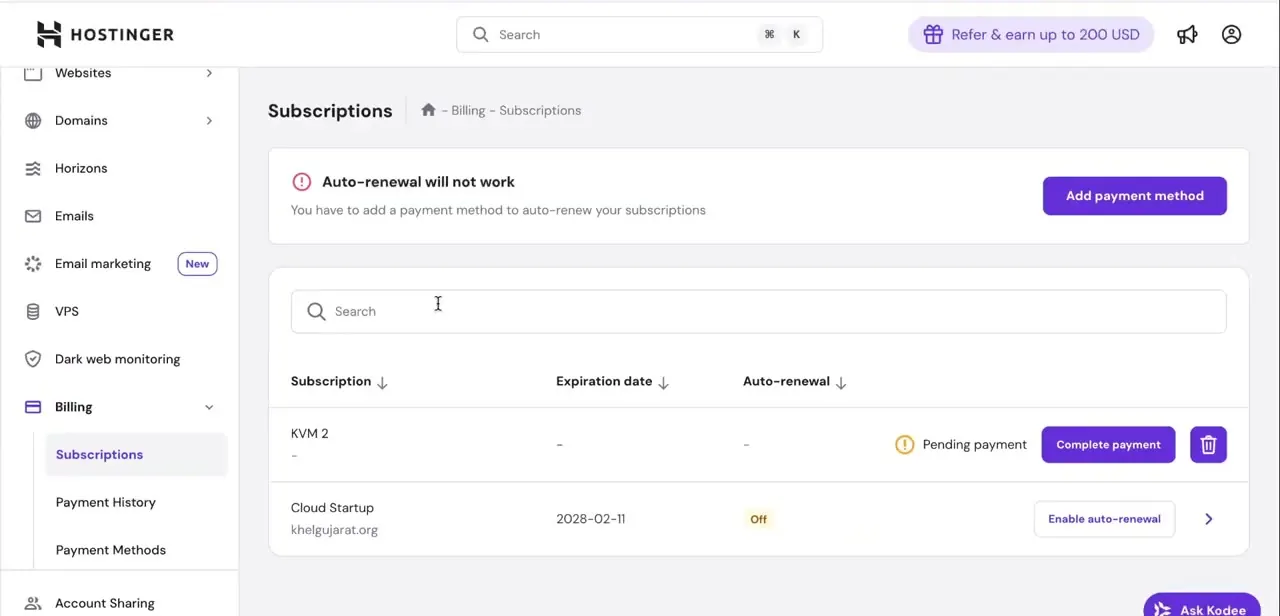
From the hPanel sidebar, open Billing and select Subscriptions. This page lists every subscription tied to the account in a table with columns for Subscription name, Expiration date, and Auto-renewal status, and it's searchable if you manage more than a handful of services. It's worth noting a banner that can appear at the top — "Auto-renewal will not work" — if there's no payment method on file; that's Hostinger telling you renewals are already effectively paused account-wide until you add one, which matters if your actual goal is just to stop being charged rather than to delete anything.
02Find the specific VPS, Cloud, or shared hosting row
Scroll or search the subscriptions list for the exact plan you want to act on — the row names the plan and, where applicable, the domain it's attached to. Not every row is in the same state: a VPS plan that was started but never paid for shows as "Pending payment" with a Complete payment button instead of an expiration date, while an active plan like a Cloud hosting subscription shows a real expiration date and its current auto-renewal status (On or Off). Knowing which state your subscription is in tells you whether you're canceling something live or simply clearing out something that never activated.
03Turn off auto-renewal on an active plan
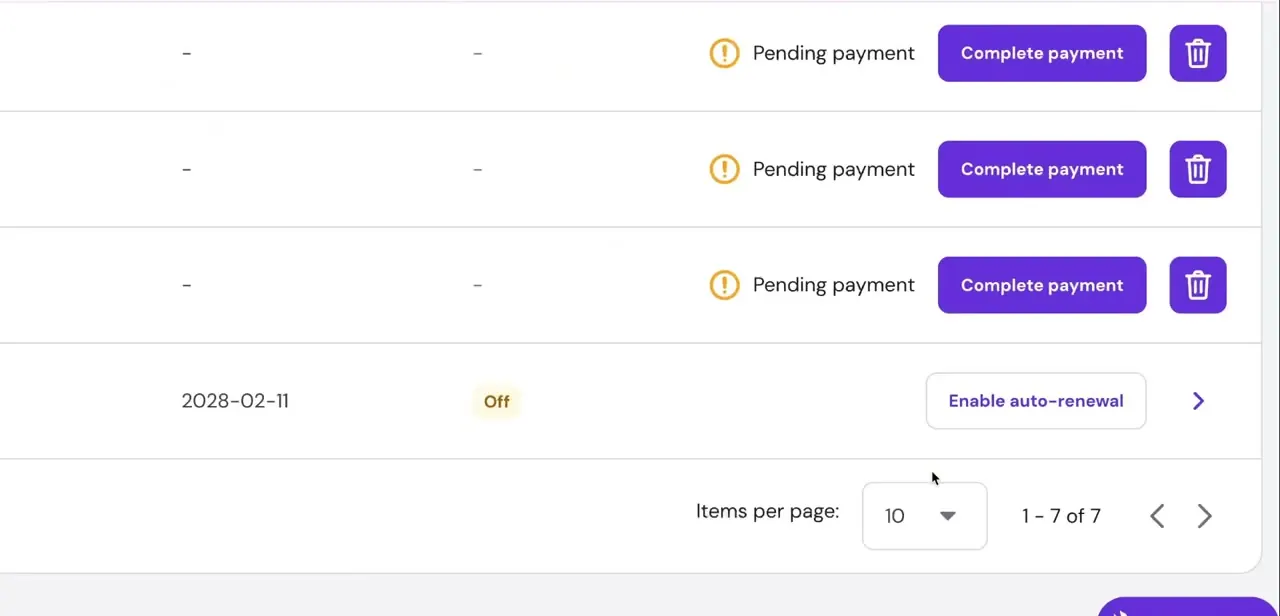
For a subscription that's still running and simply shouldn't renew again, use the auto-renewal control in its row rather than deleting anything. When it's already on, the button reads something like "Disable auto-renewal"; when it's off, it reads "Enable auto-renewal," which is also how you'd confirm the change actually took. Turning this off lets the plan keep working until its listed expiration date without charging you again, which is the safest option if you're not certain you want the hosting environment gone immediately.
04Delete the subscription with the trash icon
Each row ends with a trash-can icon, and that's the delete control for removing the subscription entry outright — this is what you'd use on a pending, unpaid VPS order you decided not to go through with, or on a service you want cleared from the list entirely rather than just left to expire. Clicking it prompts a confirmation before anything is removed, since deleting is more final than switching auto-renewal off. If the plan holds live data — files on a VPS, an active shared hosting site — make sure anything you need is backed up before using this option, because removal here is meant to be permanent.
05Confirm the change stuck
After disabling auto-renewal or deleting a subscription, refresh the Subscriptions page and check the row again: a canceled plan should show its auto-renewal toggle in the Off state, and a deleted one should simply no longer appear in the list. If you were trying to stop charges specifically, also check Billing → Payment Methods — removing a card there is a second, separate way to make sure nothing on the account can auto-renew, on top of whatever you changed at the subscription level.
Frequently asked questions
Will canceling my Hostinger VPS stop future charges immediately?
Turning off auto-renewal on the subscription row stops the next charge, but the plan itself typically keeps running until its listed expiration date rather than shutting off instantly.
Can I delete shared hosting without canceling the whole account?
Yes — each subscription has its own row and its own delete (trash) icon in Billing → Subscriptions, so you can remove one plan while others, and your account itself, stay active.
What does "Pending payment" mean on a subscription row?
It means the plan was started but never paid for, so it never activated. These rows show a Complete payment button instead of an expiration date, and can be deleted directly if you decide not to proceed.
Is it safe to delete a VPS from the dashboard?
For a plan that's actually running, only after you've backed up anything you need — deletion there is permanent. For a pending, unpaid order that never activated, there's nothing to lose by deleting it.
Why would I turn off auto-renewal instead of deleting the subscription?
Turning off auto-renewal lets a paid plan keep working until it naturally expires, with no more charges after that. Deleting removes the subscription entry immediately, which is more disruptive if the service is still in use.
Watch the full walkthrough
The same steps, demonstrated on screen from start to finish.


