Easy Tech Tuts
How to Create a CRM With Google Sheets and Gemini AI | No-Code Build | Easily 2026
By Impran M N
You don't need dedicated CRM software to track customers and manage a sales pipeline, especially if Google Sheets and Gemini are already part of your toolkit. The trick is not starting from a blank spreadsheet and guessing at columns — it's asking Gemini to design the structure for you first, then building the sheet around that plan.
This guide covers prompting Gemini for a CRM blueprint tailored to your actual business, translating that blueprint into a working spreadsheet, and automating the data entry that would otherwise eat your week. It's aimed at freelancers and small teams who want something that works today, not a system they'll spend a month configuring. It also covers how to keep the system from becoming bloated as your customer list grows, which is where most homegrown CRMs eventually fail.
01Start from a blank Gemini prompt
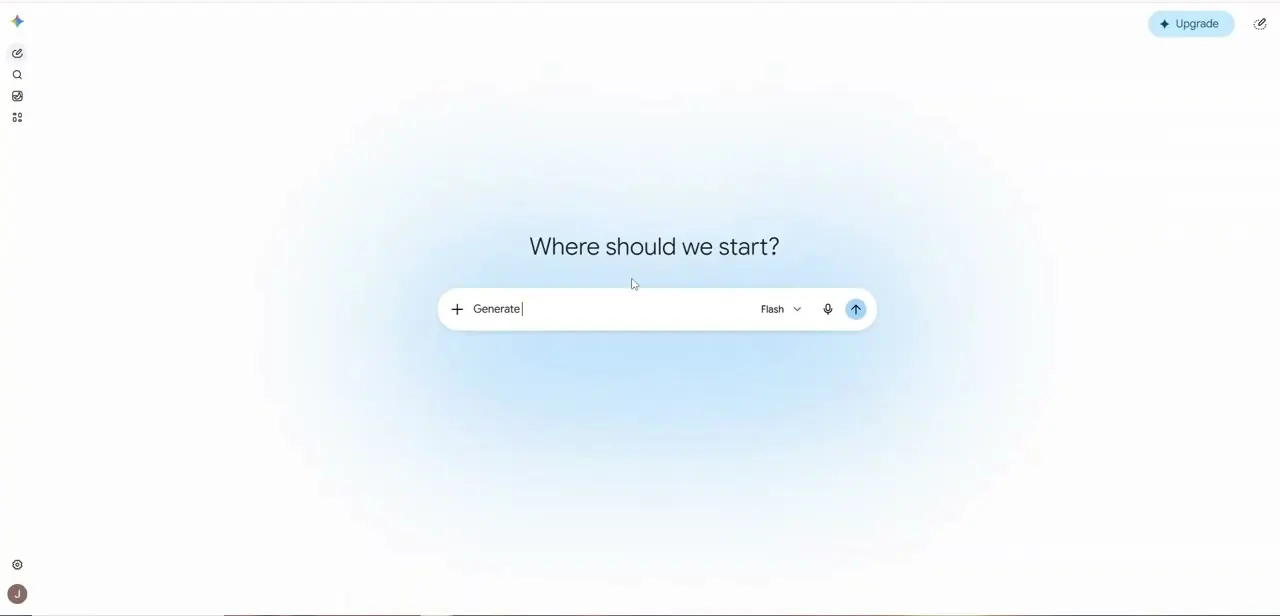
Open Gemini and you'll land on a simple "Where should we start?" screen with a single input box and a model selector — Flash is the default and is plenty for this kind of planning task. Rather than opening Google Sheets first and improvising columns, start here: describing your business to Gemini up front gets you a structure suited to how you actually sell, instead of a generic contacts list you'll rebuild in a month.
02Ask Gemini to design your CRM structure
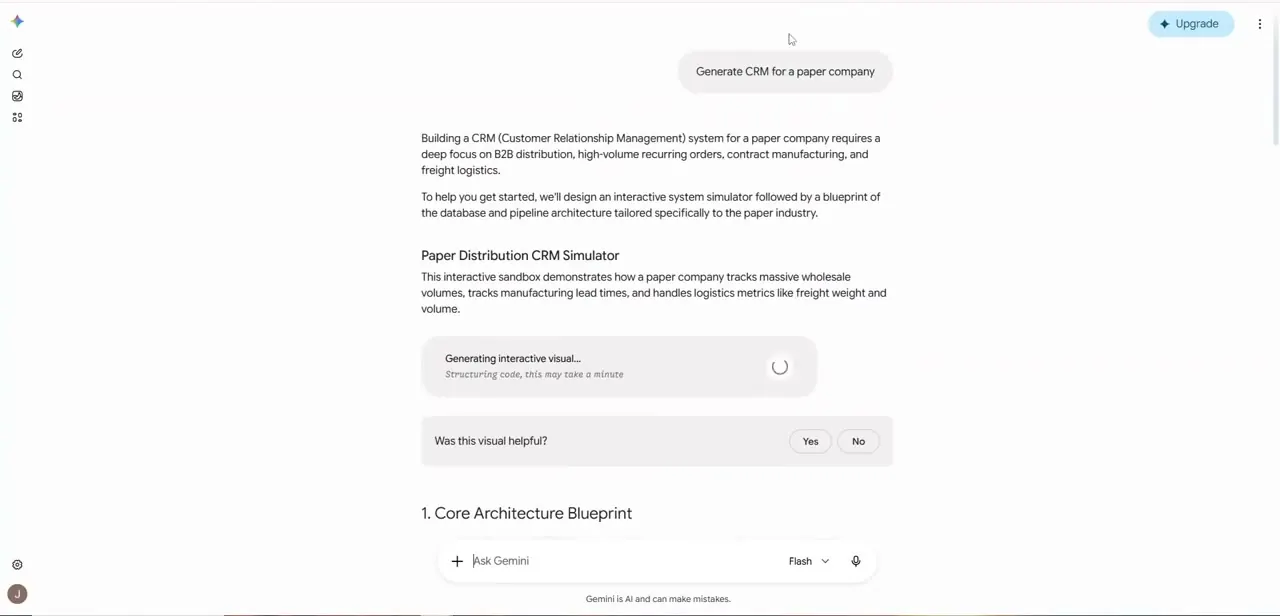
Prompt Gemini with specifics about your business rather than a generic "build me a CRM" request — the example here asks for a CRM for a paper company, and Gemini responds by identifying the real drivers of that business (B2B distribution, high-volume recurring orders, contract manufacturing, freight logistics) before proposing anything. It then lays out a plan in two parts: an interactive simulator to visualize how the system should behave, followed by a written database and pipeline architecture — starting with a "Core Architecture Blueprint" section that defines the tables and fields you'll actually build. The more concrete your prompt is about your product, customers, and sales cycle, the more useful this blueprint becomes.
03Translate the blueprint into a Google Sheet
Once Gemini has proposed the architecture — typically a customer table, a deals or pipeline table, and an interactions log — recreate those as tabs in a new Google Sheet, using Gemini's suggested field names as your column headers. Keeping the structure Gemini proposed, rather than merging everything into one tab, is what makes filtering and reporting work cleanly later, since deals and interactions each need their own row-per-record rather than being crammed into notes columns on a contacts sheet. If Gemini's blueprint includes an interactive simulator, treat it as a way to sanity-check the structure before you build — walking through a mock scenario in the simulator can surface a missing field faster than staring at a list of proposed columns.
04Automate repetitive data entry
With the sheet structured, use Gemini to cut down on manual typing: ask it to draft formulas that flag stale deals, auto-calculate days-since-last-contact, or standardize inconsistent entries like phone numbers and company names pasted in from different sources. This is where the AI half of the build pays off day to day — the spreadsheet itself is just Google Sheets, but Gemini keeps generating the small pieces of logic that would otherwise require you to know spreadsheet functions by heart. If you're pulling in leads from a form, an inbox, or another tool, ask Gemini to write the specific formula or script for that exact source rather than a generic one, since the messiness of pasted-in data tends to be source-specific.
05Manage outreach and your pipeline
Use the pipeline tab as your single source of truth for where each deal stands, updating stage columns — New, Contacted, Proposal Sent, Closed — as conversations progress instead of tracking status in your inbox. Sort and filter by stage or by last-contact date at the start of each week to see who's overdue for a follow-up; that habit is what actually makes a lightweight CRM outperform sticky notes and memory, regardless of how simple the underlying tool is.
06Keep the system lightweight as you grow
Resist the urge to add every possible field the moment you set this up — a CRM that's tedious to update gets abandoned within a few weeks. Add new tabs or columns only when you hit a real gap, and periodically ask Gemini to review your structure against how you're actually using it, since it can suggest simplifications once it sees which fields you've left consistently empty.
07Plan for the point you outgrow it
A spreadsheet-based CRM has a natural ceiling — once you're tracking more than a few hundred active relationships, or need multiple people editing simultaneously without version conflicts, dedicated CRM software starts earning its cost. Treat this build as the right tool for where your business is now rather than a permanent decision, and keep your data structured cleanly enough from the start that exporting it into a dedicated tool later, if you ever need to, is straightforward rather than a rebuild from scratch.
Frequently asked questions
Do I need coding knowledge to build this CRM?
No. The entire build uses Gemini's chat interface to design the structure and Google Sheets to hold the data — no scripts or formulas beyond what Gemini can generate for you on request.
Can this CRM actually replace dedicated CRM software?
For freelancers and small teams tracking a manageable number of deals, yes — it covers contacts, pipeline stages, and follow-up tracking without a monthly software bill. Larger teams with complex approval workflows will eventually outgrow it.
What should I actually ask Gemini for when starting out?
Be specific about your business model, not just "build me a CRM." Mention your product, typical deal size, and sales cycle so Gemini proposes a structure suited to your actual workflow, the way it tailored a paper company's CRM around B2B distribution and recurring orders.
What can Gemini automate within this setup?
Beyond the initial structure, Gemini can generate formulas for flagging overdue follow-ups, standardizing messy data entries, and calculating pipeline metrics — reducing the manual spreadsheet work as you use it.
Who is this approach best suited for?
Freelancers, small business owners, and small teams who want core CRM functionality without a software budget or a lengthy setup process.
Watch the full walkthrough
The same steps, demonstrated on screen from start to finish.