Easy Tech Tuts
How to Build a Website Using Claude AI | No Coding Needed | Easily 2026
By Impran M N
Establishing an online presence usually means either learning to code or hiring someone who already can, but Claude removes that barrier by turning the process into a conversation. Rather than handing you a blank template to fill in, Claude asks what your site is for and who it's speaking to, then builds around your answers.
This guide walks through starting that conversation, the specific questions Claude asks to shape the design, and what happens behind the scenes while it puts the site together — using a real portfolio-site build as the example throughout. It also covers how to review, refine, and keep updating the result afterward, since a site built in minutes is only useful if it's just as easy to maintain.
01Tell Claude what you're building
Start a new conversation and describe your goal directly — "help me create a website for my portfolio" is enough of a starting point. Claude doesn't jump straight to generating a generic template; it briefly reasons through your request first, then begins asking the specific questions it needs answered before writing a single line of the site. You don't need a fully formed plan before you start typing — the same way you'd brief a freelance designer, a rough sense of what the site is for is enough, since Claude's follow-up questions do the work of narrowing that down.
02Answer Claude's design questions
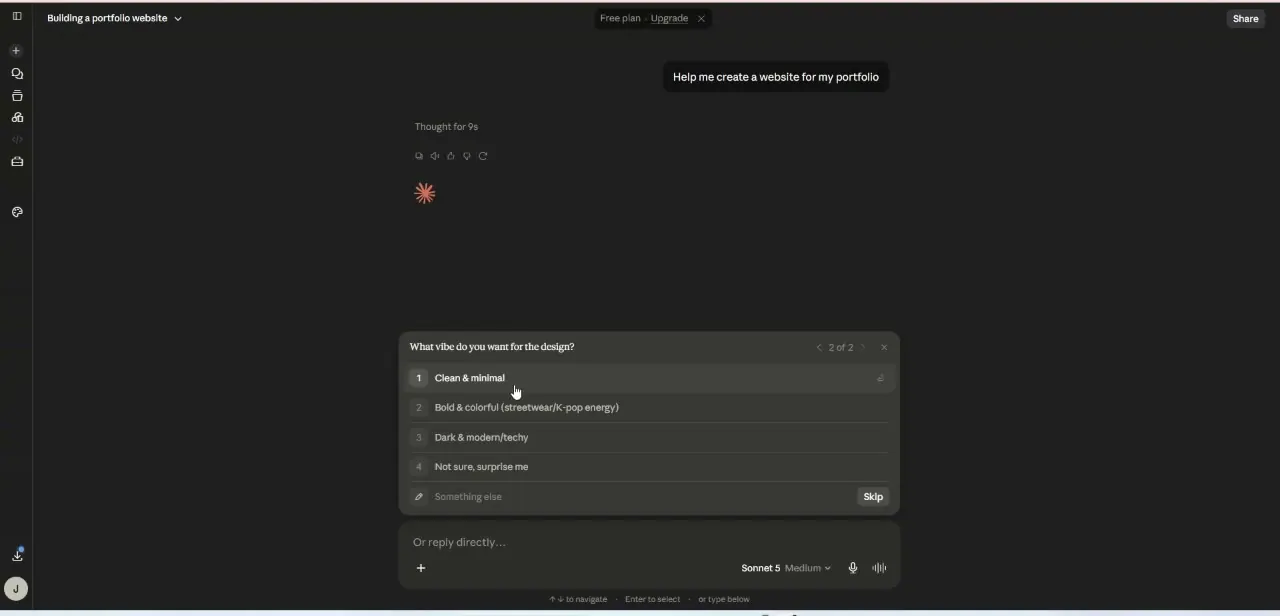
Claude presents its questions as a short interactive menu rather than open text fields, which keeps the process fast — for a portfolio site, it asks what vibe you want for the design, offering choices like Clean & minimal, Bold & colorful with streetwear or K-pop energy, Dark & modern/techy, or "Not sure, surprise me," with a Skip option and the ability to type your own answer instead. Picking from the list is faster than describing a design in prose, and Claude uses your answer as a real constraint on what it builds next rather than a vague suggestion.
03Watch Claude turn your answers into a build plan
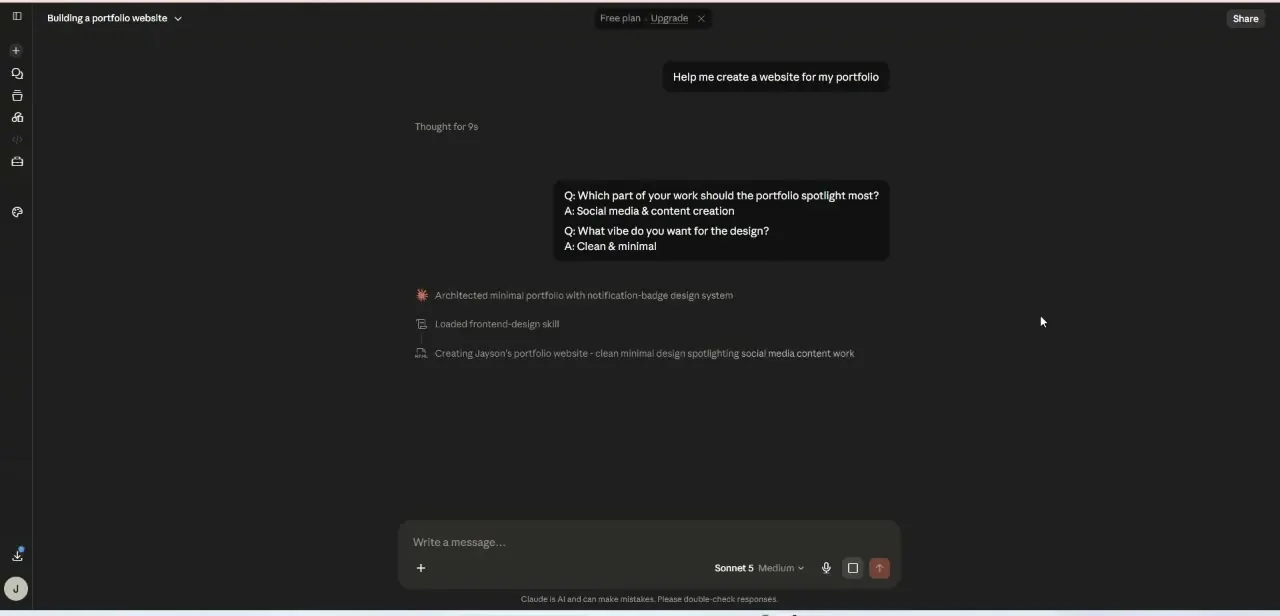
After you've answered a couple of questions — in this case, which part of your work the portfolio should spotlight (social media and content creation) and the vibe (clean and minimal) — Claude recaps both answers before acting on them, so you can catch a wrong selection before it shapes the whole site. It then works through visible build steps: architecting a minimal portfolio with a notification-badge design system, loading a frontend-design skill suited to the task, and finally creating the actual site described as "clean minimal design spotlighting social media content work." Seeing these steps listed out is useful even if you don't touch anything — it tells you Claude is building toward your specific answers, not a stock layout.
04Review the generated site
Once Claude finishes building, look it over the way you would a first draft from a designer — check that the spotlighted content actually matches what you asked for, that the navigation makes sense, and that the overall vibe matches the option you picked. It's normal for a first pass to need adjustment; treat this as the starting point for refinement rather than the finished product. Read through any placeholder text carefully too — generated copy is a starting point, not something to publish unedited, especially anywhere it references specific details about you or your work.
05Refine it through follow-up requests
Keep working in the same conversation to adjust anything that's off — ask Claude to swap a section's order, change a color, rewrite a headline, or add a contact form, and it can modify the existing build rather than starting over. This iterative back-and-forth is where a no-code build actually becomes a personalized site rather than a template with your name pasted on it.
06Maintain and update it going forward
Once the site is live, come back to the same conversation whenever you need to update it — new portfolio pieces, updated contact details, a seasonal design tweak — and describe the change the same way you described the original build. Because Claude already has the context of what it built and why, updates tend to be faster than the initial setup, which is the real advantage of this approach over a static template you'd otherwise have to edit by hand.
07Know the limits before you rely on it
This approach is strongest for straightforward marketing and portfolio sites — the kind most small businesses and individuals actually need. If you eventually require custom backend functionality, complex e-commerce logic, or tight integration with other business systems, you'll likely outgrow a purely conversational build and need to bring in more specialized tools or a developer. Knowing that ceiling up front helps you decide whether this is the right long-term foundation or a fast way to get something live while you plan for something more complex later.
Frequently asked questions
How does Claude know what kind of website to build?
It asks a short series of questions first — like what vibe you want and which part of your work to spotlight — and uses your answers as constraints on the actual build rather than generating a generic template.
Do I need any coding knowledge?
No. The entire process happens through conversation — describing your site, answering Claude's design questions, and requesting changes afterward.
What if I don't like the first version Claude builds?
Treat it as a first draft. Stay in the same conversation and ask Claude to adjust specific things — colors, section order, copy — rather than starting over from scratch.
Can I maintain and update the site myself afterward?
Yes — return to the same conversation and describe the update you want. Because Claude retains context on what it already built, changes are typically faster than the initial build.
Who is this approach best suited for?
Beginners, small business owners, and entrepreneurs who want a working site quickly without hiring a developer or learning a website builder's interface.
Watch the full walkthrough
The same steps, demonstrated on screen from start to finish.